

Businesses have already introduced AI into parts of their operations. But in many cases, the work itself still moves the same way it always did, through inboxes, manual intervention, and repeated coordination between teams that share no common system.
A 2026 automation report found that only 21% of organizations currently run AI workflows at a level that delivers consistent operational returns. The barrier is rarely the technology. Process clarity, system integration, and governance determine whether automation delivers or stalls.”
That is what separates AI workflow automation from adding another AI tool to the stack. This blog covers what it is, how it works, where it delivers the most operational value, and what it takes to implement it in a way that scales.
What AI Workflow Automation Is and How It Differs From Standard Automation?
Most businesses already use workflow automation for tasks like notifications, approvals, and ticket routing. These rule-based workflows work well for predictable processes but struggle when inputs change, exceptions occur, or business conditions evolve.
AI workflow automation uses machine learning, natural language processing (NLP), and decision logic to interpret incoming work, understand context, and determine the next step across systems and teams.
The key difference lies in how each approach handles variation:
- Traditional workflow automation follows predefined rules and routes unexpected cases to manual review.
- RPA (Robotic Process Automation) automates repetitive tasks like copying data, updating records, and triggering system events, but does not make process-level decisions.
- AI workflow automation interprets unstructured information, validates it against existing records, assesses context, and routes work intelligently with minimal manual intervention.
Unlike traditional automation, AI workflows use business context—such as approval policies, customer-specific terms, team availability, and compliance requirements—to make more accurate decisions at scale.
Why Manual and Rule-Based Workflows Break at Scale
Operational friction rarely announces itself. It builds through delayed approvals, inconsistent data entered across systems, and manual exceptions that are resolved without being documented. Each instance is small. Across an organization, the cost is structural.
The breakdown follows a consistent pattern across teams regardless of industry or size:
- Approvals stuck. A request reaches the right person and is put on hold. No detection, no backup routing, and no visibility for anyone downstream until someone notices.
- Fragmented context. An agent pulling information from four separate platforms every time incurs coordination costs that add no judgment value to the resolution.
- Exceptions bypass process. Re-keying between systems introduces inconsistencies: missing fields, format mismatches, and data errors that surface as rework downstream, making corrections more expensive than the original task.
- Static rules break. Rules written for anticipated scenarios cannot handle variation. New product lines, customer segments, or regulatory changes can fall outside the original rules set, causing the workflow to stall or forcing a manual override.
Rule-based automation addresses predictable volume but cannot absorb that variation. As the business scales, the gap between what the rules cover and what the operation actually encounters widens. The maintenance burden on the automation grows alongside the operational burden it was supposed to reduce.
The real cost does not appear as a single line item. It lives in cycle times, rework rates, and coordination time that produce no output, compounding quietly until it is too expensive to ignore.
How Intelligent Workflows Work: From Data to Decision
AI workflow automation is not a single action. It is a connected sequence that moves work from input to decision, execution, and feedback. The workflow should not be treated as a black box but as a deployment that supports, routes, or escalates decisions.
This is how an AI automation workflow usually moves:
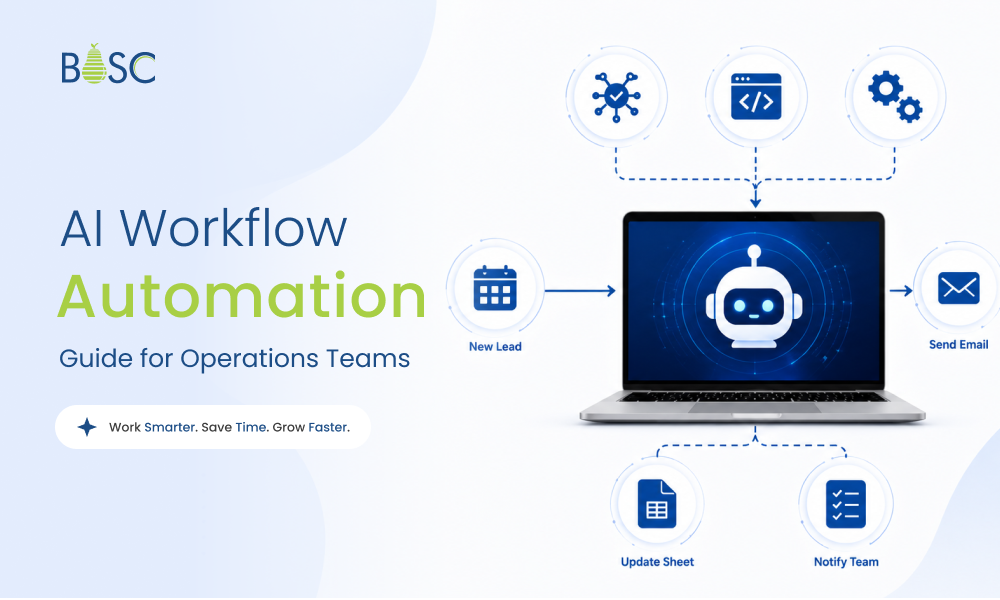
- Trigger: A workflow begins when a defined event occurs: an incoming email, a document upload, a form submission, a ticket update, or a system alert. This signals the process to begin.
- Context collection: The workflow pulls relevant data from systems in use, such as the CRM, ERP systems, ticket history, financial records, policy documents, or knowledge bases. The AI does not evaluate in isolation; it evaluates with the surrounding context.
- AI processing layer: This is where the workflow interprets context. AI can classify requests, extract data, summarize history, validate records, identify gaps, or flag risks. Instead of just checking rules, it understands what the input means and what should happen next. Based on that inference, the decision engine acts:
| Decision | When It Triggers |
| Auto-approve | Input meets defined confidence thresholds and policy conditions |
| Route to reviewer | Request type, value, team availability, and escalation logic determine the right path |
| Flag for human review | Confidence is low, the case falls outside normal parameters, or compliance requires sign-off |
| Escalate | A defined time threshold is breached without resolution |
- Decision & routing: Based on data, confidence levels, business rules, and approval logic, the workflow determines whether the task can proceed, requires human review, should be escalated, or must be returned for correction.
- Execution: The workflow executes the next step by updating records across connected systems, sending notifications, creating follow-up tasks, generating documents, or moving the request to the next queue, inside the tools where work already happens.
- Continuous Refinement: Each approval, override, correction, and outcome generates workflow data. Over time, teams use this data to identify delays, adjust decision rules, and expand automation across connected processes.
This is the process that separates intelligent workflows from basic automation. Each workflow is not just about executing a predefined sequence. It is about reading context, applying business logic, routing work based on conditions, and improving through how people interact with it.
For example, a vendor invoice arrives in a non-standard format. OCR extracts the line items, and the ML model validates them against the purchase order in the ERP. If values match, it is auto-approved. If there is a discrepancy, it escalates to the right reviewer with the deviation and relevant policy already surfaced. No email chain. No manual review. No status chasing.
Where AI Workflow Automation Has the Most Operational Impact
The workflows that deliver the clearest, fastest results share three characteristics. They run at high volume, follow identifiable decision logic, and have measurable outcomes. These are not always the most complex workflows in the business.
They are typically high-volume workflows that span multiple systems and slow down when information is incomplete, inconsistent, or falls outside predefined conditions.
1. Finance and Accounts Payable
Invoice processing, three-way matching, payment approvals, purchase orders, tax rules, and anomaly detection are among the most resource-intensive back-office functions in any organization. They are also among the most rules-driven.
Yet in most operations, a standard invoice that matches the purchase order still needs manual intervention because the systems involved do not communicate with each other. AI workflow automation changes the mechanics of this process. The automation layer reads non-standard invoice formats and extracts relevant line items for validation. The validation layer then:
- Matches line items against the corresponding purchase order in the ERP
- Checks vendor records and payment history
- Flags discrepancies before they move downstream
- Routes exceptions to the right reviewer with the issue already identified
The outcome is faster invoice processing, fewer manual checks, reduced rework, and an audit trail built into the workflow rather than assembled after the fact. BOSC’s AI Workflow Automation solution supports this layer through document extraction, ERP integration, validation logic, and approval routing built around the finance systems a business already uses.
2. HR and Onboarding
Onboarding is not one task. It is a chain of dependent actions across HR, IT, finance, administration, legal, and the hiring manager. A new hire record may trigger activity across HR, IT, legal, finance, and administration simultaneously. When these actions are tracked manually, one missed dependency can delay the entire experience.
AI workflow automation brings sequential coordination to this process by:
- Triggering provisioning requests across departments automatically
- Tracking pending documents and flagging incomplete submissions
- Routing approvals in the correct sequence across teams
- Escalating delays before they push back the hire’s start date
The outcome is a more consistent onboarding experience, fewer missed steps, faster access readiness, and less administrative coordination for HR and IT teams.
3. Customer Operations and Support
Customer support workflows depend on speed, context, and correct routing. Incoming requests vary by issue type, urgency, product area, and complexity. When support teams manually classify and route these, response times increase before actual problem-solving begins.
AI for process improvement first works at the triage layer. It can:
- Read the ticket and classify the issue
- Detect urgency or sentiment
- Summarize previous interactions
- Identify the right queue
- Route the case based on availability, expertise, customer priority, or escalation rules
For complex cases, the agent receives the context before opening the ticket, rather than manually searching across systems. The outcome is faster triage, fewer misrouted tickets, better SLA control, and less time spent gathering information before resolution.
BOSC’s AI customer support agents are designed for this end-to-end. Classification, routing, response assistance, and resolution workflows reduce manual workload while keeping human agents involved when judgment, escalation, or customer sensitivity is required.
A BOSC-built AI reception system deployed at a healthcare clinic handles patient intake, call transfers, and routine coordination across clinic operations. In production, the system reduced hold times by 80%, cut staff coordination workload by 50%, and maintained 95% call handling accuracy. These results were driven by workflow design and integration logic, not model choice. Read the full case study.
4. Procurement and Vendor Management
Purchase requests, vendor onboarding, compliance checks, and budget validations follow predictable logic. Yet they consistently create bottlenecks because that logic is not enforced automatically. A standard purchase request that falls within budget and meets policy criteria should not take three days and four emails to approve.
AI workflow automation applies policy-based routing to procurement by:
- Validating purchase requests against budget thresholds and policy rules
- Checking vendor compliance status against internal records
- Auto-approving requests that meet defined conditions
- Flagging exceptions and routing them with the supporting context already assembled
Controls stay intact. The approval cycle shortens. And every decision is documented without anyone having to maintain a separate log.
Advantages of Workflow Automation at the AI Layer
The advantages of workflow automation are easy to describe and harder to ignore once operations teams start measuring them. Less time spent on coordination. Fewer errors reaching downstream systems. More consistent decisions. Better capacity utilization. The goals stay the same. What AI changes is the consistency with which operations actually reach them.
| Advantage | What It Means in Practice |
| Faster cycle times | Approval-dependent processes move in hours, not days. The review time stays the same. The waiting time drops. |
| Lower rework | Validation happens at entry, not discovery. Errors are caught before they travel downstream and cost more to fix. |
| Process visibility | Teams gain a live view of process health without waiting for someone to compile a status report. |
| Consistent policy enforcement | The same rules apply every time, regardless of who handles the request or how busy the team is. |
| Better capacity utilization | Repetitive coordination shifts to higher-value work without requiring teams to grow. Output improves without adding headcount. |
| Operational scalability | Volume grows, but coordination does not scale with it. That gap is where the advantages of workflow automation compound. |
What to Consider Before Implementing AI Workflow Automation
An AI-enabled workflow performs in proportion to the quality of what it is given to work with. A poorly documented process and inconsistent data do not become cleaner after automation. AI will only move the problem faster across the operation.
Before introducing an intelligent workflow, teams need to understand:
- Process Clarity: Mapping process logic before automation begins is the required foundation. Any undocumented inconsistency gives the system conflicting signals and produces outputs that reflect the confusion rather than resolve it.
- Data Availability: The decision layer learns from historical process data. If that data is sparse, irrelevant, or inaccessible, the model starts with a limited signal and takes longer to reach reliable performance.
- Integration Readiness: The workflow should be able to read from existing systems, update records, trigger tasks, send notifications, and log outcomes without requiring teams to manually copy information.
- Governance Rules: Before go-live, define:
- Which decisions require human consent regardless of confidence level
- What thresholds trigger escalation rather than auto-approval
- Who holds override authority, and how overrides are logged
- What the audit trail looks like and who can access it
- Success Metrics: Metrics should directly align with the automated process. Cycle time and exception rate for invoice workflows, routing accuracy, and SLA performance for support operations, access readiness, and time to completion for onboarding.
Why AI Workflow Implementations Stall, and How to Avoid It
AI workflow automation projects often fail due to poor process selection, weak planning, inadequate integration, and unclear success metrics.
Mistake 1: Automating the Wrong Process First
Complex, exception-heavy workflows seem like the highest-value targets because they consume the most manual effort. They are also the worst place to start. A workflow with unpredictable inputs, unclear ownership, and frequent edge cases gives the model an inconsistent signal from day one.
High-volume, well-documented, rules-consistent processes reach reliable performance faster and build the organizational confidence needed to expand. This is where our AI consulting services fit naturally for identifying automation-ready workflows, defining success metrics, and sequencing implementation before the scope expands.
Mistake 2: Automating a Broken Process
If the current workflow is unclear, AI will only accelerate confusion. Processes with informal approvals, undocumented exceptions, or inconsistent data do not become efficient just by adding automation. The prerequisite is a process that people follow the same way every time, and if that is not true yet, process design comes before workflow design.
Mistake 3: Ignoring Integration
An automation layer that cannot connect to the CRM, ERP, HRMS, or ticketing systems creates a parallel process rather than replacing one. Teams end up maintaining both the automated path and the manual workarounds built around its gaps, defeating the purpose of automation.
Our AI integration service addresses this directly by connecting the automation layer to existing systems and data sources to update records, trigger actions, and log outcomes within the tools.
Mistake 4: Removing Human Review Too Early
Confidence in a workflow’s outputs is earned through observation, not assumed at deployment. Removing review checkpoints before the model has demonstrated consistent accuracy on live data creates compliance exposure and erodes team trust.
Human review should be designed into the workflow from the beginning. Confidence thresholds, escalation paths, and override permissions need to be defined before the workflow goes live.
Mistake 5: Treating Deployment as the Finish Line
A workflow that goes live and is never reviewed only degrades with time. Request types change, policies evolve, systems update, and the model drifts from operational reality.
After deployment, observability and monitoring help teams track exception patterns and performance drift, so workflow logic can be refined before quality issues affect delivery outcomes.
Metrics That Show Whether AI Workflow Automation is Working
Defining success metrics before implementation begins, as covered in the previous section, is only half the equation. The other half is knowing what to track once the workflow is live. The metrics below align directly with the operational problems AI workflow automation is designed to address: coordination delays, downstream errors, compliance gaps, and process throughput.
| Metric | What It Measures |
| Cycle time reduction | How much time a process takes from trigger to completion, before and after automation |
| Decision latency | The gap between a task arriving and a decision being made, where AI routing has the most direct impact |
| Cost per transaction | The total resource cost of processing one unit: one invoice, one ticket, one request |
| Error rate | How often incorrect or incomplete data moves through the workflow without being caught |
| Rework rate | How frequently downstream teams need to correct work because of an upstream error |
| SLA compliance | Whether service-level commitments are being met consistently across automated workflows |
| Exception rate | The share of cases requiring human intervention. A declining rate indicates the model is learning and routing more accurately |
| Human override rate | How often reviewers change an AI-generated decision. High rates signal that training data needs adjustment |
| Workflow throughput | How many cases the workflow process per day or week without adding coordination overhead |
| Customer response time | How quickly customer-facing workflows such as support routing and request handling, reach resolution |
| Employee adoption | Whether the teams whose work feeds into the workflow are actually using it consistently |
| Audit readiness | The system’s ability to produce a complete, timestamped record of every decision and action on demand, without manual assembly |
Scaling Intelligent Workflows Across Projects
Proving value in one workflow is the starting point, not the destination. The real operational advantage of AI workflow automation becomes visible when the logic, structure, and integration patterns from that first deployment are extended across similar processes.
- Standardize the classification logic, decision rules, and integration interfaces from the first workflow so adjacent processes can inherit them rather than rebuild from scratch.
- Keep workflows connected across departments through consistent system integrations. Isolated automation recreates the fragmentation it was built to solve.
- Use the same selection criteria for the next workflow as the first: high volume, clear decision logic, measurable outcome, and integration-ready systems.
- Treat exceptions, overrides, and outcome data from each live workflow as inputs into the next. Each deployment makes the one that follows more accurate and faster to stabilize.
Improving AI Workflow Automation for Operational Intelligence
Operational efficiency does not improve by adding automation to a broken process or a disconnected system. It improves when the right workflows are identified, properly mapped, connected to existing infrastructure, and governed with clear rules from the start.
The organizations getting measurable results from AI workflow automation are not the ones with the largest budgets or the most ambitious rollouts. They are the ones who started with one well-chosen process, measured it honestly, and built from there.
BOSC Tech Labs designs AI workflows around the systems, approval logic, and data flows your operations already run on, starting with the process that is causing the most friction, not the most impressive one on paper. Talk to a solutions architect today.
Frequently Asked Questions
1. What is the difference between AI workflow automation and RPA?
RPA automates task-level actions like copying data, filling fields, or triggering system events. AI workflow automation handles process-level decisions by interpreting context, routing work, and escalating exceptions.
2. Which workflow should a business automate with AI first?
Start with a high-volume workflow that follows clear decision logic and has measurable outcomes. Invoice processing, ticket routing, onboarding, and approval workflows are usually strong starting points.
3. Can AI workflow automation work with the systems we already use?
Yes, if it is designed around existing systems. A strong AI automation workflow connects with tools like CRM, ERP, HRMS, ticketing platforms, finance systems, and internal databases.
4. How long does it take to implement an AI workflow automation system?
It depends on process complexity, data quality, integrations, and review requirements. A focused, well-documented workflow with clean integrations typically stabilizes faster than a multi-department rollout. A scoping conversation helps identify a realistic timeline before work begins.
5. Will AI workflow automation reduce headcount?
Not necessarily. Its main value is reducing repetitive coordination, manual routing, and status chasing so teams can focus on approvals, exceptions, customer issues, and process improvement.