

Small and mid-sized businesses are under pressure to respond faster without adding the same amount of operational overhead. Manual data entry, email-based approvals, repetitive customer questions, and disconnected systems can quietly consume hundreds of hours each month.
AI workflow automation helps businesses redesign that work. Instead of using AI only to generate text, teams can connect AI models to documents, CRMs, calendars, help desks, ERPs, knowledge bases, and internal approval systems.
The result is a workflow that can understand an incoming request, classify it, retrieve relevant information, trigger the next action, and escalate exceptions to the right person.
This guide explains seven high-ROI AI workflows for SMBs, how to select the right starting point, how to estimate potential value, and how to implement AI automation safely.
What is AI workflow automation?
AI workflow automation combines artificial intelligence with business-process automation and system integration.
Traditional automation follows predefined rules. AI workflow automation can also interpret documents, understand natural-language requests, classify information, generate drafts, identify patterns, and recommend the next action.
| Traditional automation | AI workflow automation |
|---|---|
| Works best with structured data and fixed rules. | Can interpret text, documents, images, and variable inputs. |
| Follows a predefined if-then path. | Uses context, models, rules, and workflow state. |
| Usually handles predictable tasks. | Can support tasks that previously required limited human judgment. |
| Often operates inside one application. | Can coordinate work across multiple business systems. |
| Exceptions may stop the process. | Exceptions can be classified, logged, and routed for review. |
AI automation does not mean removing people from every process. Harvard Business School Online distinguishes between automation, where systems act independently, and augmentation, where AI supports human judgment while people remain accountable for important decisions.
For production use, the right design may combine both approaches. Routine requests can move automatically, while sensitive, unusual, or high-value decisions require human approval.
BOSC helps teams design and build these systems through its AI and Automation Services, including RAG development, LLM development, AI application development, AI integration, and AI agent development.
When should an SMB consider AI workflow automation?
AI workflow automation is worth evaluating when the same work happens repeatedly and creates measurable operational friction.
Common signals include:
- Employees copy the same information between email, spreadsheets, CRM, ERP, or help-desk systems.
- Customers wait too long for routine answers, confirmations, or updates.
- Approvals are delayed because requests remain inside inboxes and chat threads.
- Teams spend too much time searching for internal documents or policy information.
- Managers cannot see workflow status without manually combining reports.
- Staff repeatedly check renewal dates, missing documents, or pending actions.
- An AI pilot works in a demonstration but is not reliable enough for production.
The strongest projects are not driven by the novelty of AI. They are driven by a specific workflow problem, a measurable baseline, and a clear owner responsible for the outcome.
How to choose the right workflow to automate first
The first workflow should be large enough to create value but bounded enough to test safely.
Score each candidate process against the following criteria before selecting a pilot.
| Selection criterion | Low-readiness signal | High-readiness signal |
|---|---|---|
| Volume | The task happens occasionally. | The task happens daily or continuously. |
| Repeatability | Every case is completely unique. | Most cases follow a recognizable pattern. |
| Data readiness | Inputs are missing, offline, or inaccessible. | Inputs are digital and available through connected systems. |
| Manual effort | The task takes little staff time. | The task consumes significant recurring effort. |
| Risk | A mistake creates serious exposure with no review path. | Exceptions can be routed to an accountable person. |
| Measurement | There is no baseline. | Time, cost, quality, or response metrics already exist. |
| Ownership | No team owns the process. | One team can approve, test, and improve the workflow. |
A good first process normally has clear inputs, predictable stages, and a measurable definition of success.
BOSC can support this discovery stage through data engineering services, including data integration, pipelines, warehouses, lakehouses, and analytics dashboards.
The 7 best AI workflows for SMBs to automate first
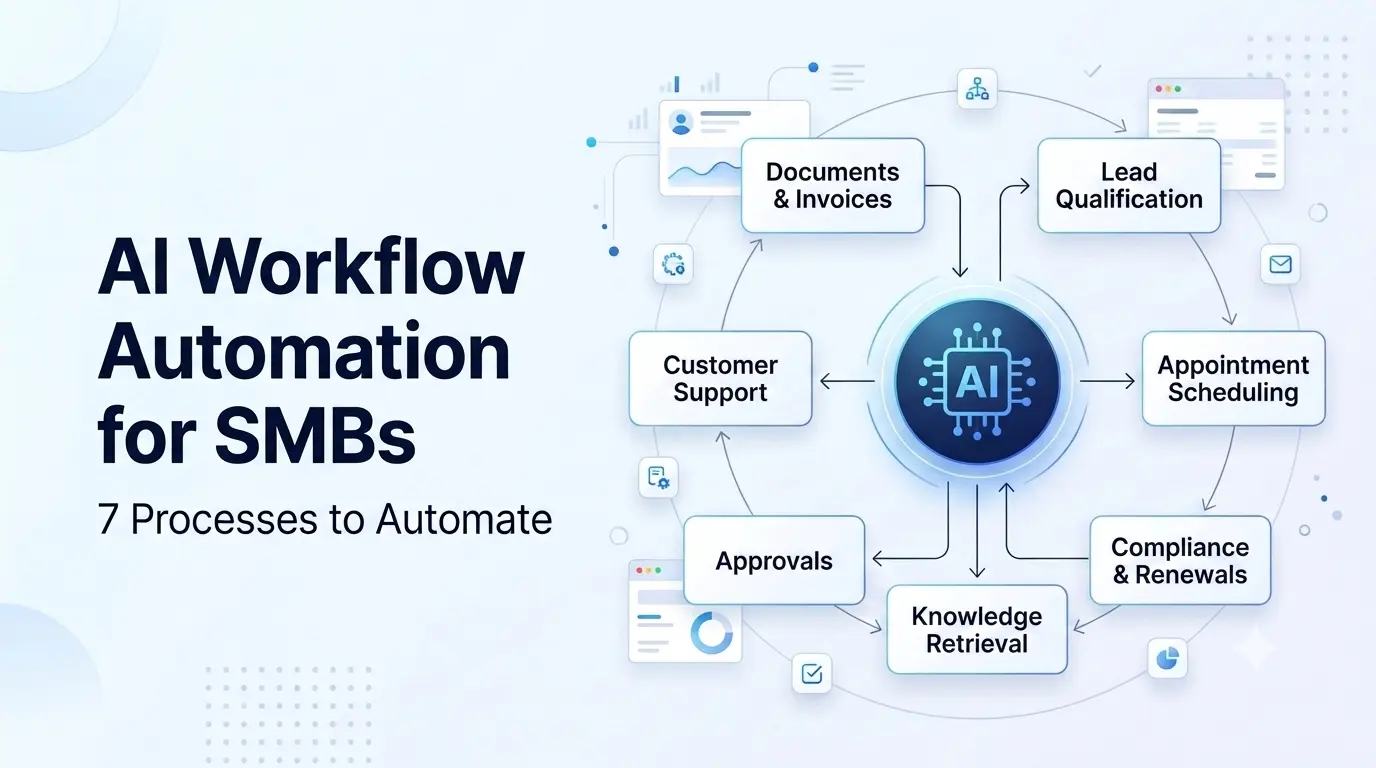
1. AI document and invoice processing
Finance, operations, procurement, and legal teams often receive invoices, purchase orders, contracts, applications, and forms in inconsistent formats.
AI document processing can extract fields, classify documents, identify missing information, route items for approval, and send structured data to an ERP, accounting platform, CRM, or document repository.
Typical workflow:
- A document arrives through email, upload, portal, or shared storage.
- AI identifies the document type and extracts relevant fields.
- The system checks for missing information, duplicates, or policy exceptions.
- The document and extracted data are routed to the correct owner.
- Approved data is synchronized with the relevant business system.
- Exceptions are logged and escalated for human review.
Useful KPIs include:
- Average processing time per document.
- Extraction accuracy and manual correction rate.
- Approval cycle time.
- Percentage of documents routed automatically.
- Duplicate or exception rate.
This workflow is especially suitable for businesses with high document volume and structured approval rules. It connects naturally with BOSC’s AI Back-Office Workflow Automation solution.
2. AI customer-support ticket triage and response drafting
Support teams often spend valuable time classifying tickets, searching documentation, writing repetitive responses, and updating records.
An AI customer-support workflow can classify incoming requests, determine urgency, retrieve approved information, draft a response, update ticket fields, and escalate complex issues.
A safe support workflow should:
- Use approved documentation and knowledge sources.
- Distinguish routine requests from sensitive or unusual cases.
- Keep a human approval step for high-risk responses.
- Record the source of retrieved information.
- Update the help desk or CRM automatically after an action.
Useful KPIs include:
- First-response time.
- Average handling time.
- Ticket classification accuracy.
- Percentage of routine requests resolved or drafted automatically.
- Escalation rate and customer satisfaction.
Businesses can explore this use case through BOSC’s AI Customer Support Agents, which are designed around ticket triage, knowledge retrieval, response drafting, guarded resolution, and workflow execution.
3. AI lead qualification and CRM updates
Sales teams lose opportunities when leads are not contacted quickly, qualification is inconsistent, or CRM records remain incomplete.
AI sales automation can evaluate incoming leads against defined criteria, identify intent signals, enrich contact records, draft personalized follow-ups, and create the next task for a sales representative.
Typical workflow:
- A lead arrives through a website form, email, campaign, or connected platform.
- AI checks fit, industry, company size, request type, and urgency.
- The lead is scored and routed to the appropriate representative.
- A contextual follow-up draft is created for review.
- CRM activity, notes, and next steps are updated automatically.
- High-value or unusual opportunities are escalated to a human seller.
Useful KPIs include:
- Lead-response time.
- Percentage of leads with complete CRM data.
- Qualification consistency.
- Meeting-booking rate.
- Follow-up completion rate.
BOSC’s AI Sales Engagement Copilot supports lead qualification, outreach drafting, CRM enrichment, engagement tracking, and pipeline visibility.
4. AI appointment scheduling and inquiry handling
Appointment-based businesses often receive the same questions about availability, services, pricing, locations, and booking procedures.
An AI receptionist or scheduling assistant can understand the request, check connected calendars, book or reschedule an appointment, send confirmation messages, and escalate unusual cases.
The workflow should connect to:
- Calendar and availability systems.
- CRM or customer records.
- Booking and payment systems where appropriate.
- Notification and reminder channels.
- Human escalation processes.
Useful KPIs include:
- Time to confirm an appointment.
- Booking completion rate.
- Missed-appointment rate.
- Front-desk workload.
- Number of scheduling corrections or double-booking incidents.
BOSC’s AI Reception Assistants are designed for appointment scheduling, inquiry handling, calendar integration, workflow coordination, and controlled escalation.
5. Internal approvals and back-office request routing
Many approval workflows still depend on email chains, spreadsheets, and manual reminders.
AI back-office automation can capture requests, classify documents, validate required information, apply business rules, route approvals, send reminders, and create an audit trail.
Examples include:
- Purchase requests.
- Expense approvals.
- Vendor onboarding.
- HR requests.
- Contract reviews.
- Procurement routing.
- Internal access requests.
A strong approval workflow does not remove human accountability. Instead, it automates routine routing while sending exceptions, threshold breaches, and unusual requests to named reviewers.
Useful KPIs include:
- Approval cycle time.
- Number of manual follow-ups.
- Percentage of requests routed automatically.
- Exception and escalation rate.
- Aging of pending approvals.
- Completeness of audit records.
For complex cross-system workflows, BOSC’s AI Back-Office Workflow Automation can connect intake, classification, approval logic, audit logging, and operational dashboards.
6. AI knowledge retrieval for employees and teams
Growing businesses often store important knowledge across PDFs, shared drives, internal wikis, emails, product documentation, and business applications.
An AI knowledge assistant can retrieve relevant information, provide a concise answer, cite the source, respect permissions, and identify documentation gaps.
A secure knowledge workflow should include:
- Role-based access controls.
- Approved and traceable source documents.
- Source attribution in responses.
- Document version and freshness checks.
- Escalation when the answer is uncertain.
- Logging for quality review and knowledge-base improvement.
Useful KPIs include:
- Time spent searching for information.
- Repeated internal questions.
- Answer acceptance or correction rate.
- Source-attribution coverage.
- New-employee onboarding time.
BOSC’s AI Knowledge Assistants use secure knowledge retrieval, multi-source document coverage, natural-language queries, and permissioned access to support reliable internal information workflows.
7. Compliance, case, and renewal tracking
Some businesses manage cases, renewals, evidence, deadlines, or compliance records across spreadsheets, email, and separate systems.
AI-assisted case-management workflows can capture records, identify missing documents, assign the next action, send reminders, track deadlines, and surface blocked cases before they become urgent.
Potential applications include:
- Immigration case and document management.
- Right-to-work and compliance checks.
- Insurance or claims administration.
- Contract renewal tracking.
- Regulatory evidence management.
- Customer onboarding and verification.
These workflows require careful permissions, auditability, human review, and secure handling of sensitive information.
BOSC’s AI-assisted immigration software solution demonstrates how application tracking, document management, deadline automation, permissioned data control, and system integrations can be combined within one operational workflow.
How to calculate AI automation ROI
AI automation ROI should be calculated from a real workflow baseline rather than a general promise about productivity.
Use this planning formula:
Estimated annual value = hours saved × loaded hourly cost + avoided rework or error cost + measurable revenue or capacity gain − implementation and operating costs.
Illustrative ROI example
Assume a 30-person company processes 1,000 routine requests each month.
| Input | Illustrative assumption |
|---|---|
| Current manual time per request | 12 minutes |
| Potential time handled by workflow automation | 50% of requests |
| Loaded hourly cost | $35 |
| Estimated monthly manual hours affected | 100 hours |
| Illustrative monthly labor capacity released | $3,500 |
This example is for planning only. Actual value depends on workflow complexity, data quality, exception rates, integration effort, adoption, and ongoing operating costs.
In addition to labor capacity, measure improvements in response time, error rates, missed deadlines, customer experience, and revenue conversion.
AI workflow automation costs: what affects the investment?
The cost of AI workflow automation varies because no two workflows have the same data, systems, rules, or risk profile.
The main cost drivers are:
- Number of systems and APIs that must be connected.
- Quality and accessibility of business data.
- Document, language, or image complexity.
- Number of workflow branches and exceptions.
- Security, permissions, and compliance requirements.
- Human-review and approval design.
- Model usage, cloud infrastructure, and monitoring.
- Testing, training, maintenance, and future changes.
A simple one-system workflow may be suitable for an existing platform or low-code automation tool. A multi-system workflow with sensitive data, custom rules, and production reliability requirements usually needs experienced AI, data, and product engineering.
Build, buy, or hire an AI implementation partner?
The right choice depends on the process, not on whether AI is popular.
| Business situation | Suitable approach |
|---|---|
| One simple workflow inside one application | Existing automation or no-code tool |
| Multiple systems, custom rules, or sensitive data | Custom AI automation implementation |
| AI embedded into a customer-facing product | AI product-engineering partner |
| Complex data pipelines or reporting requirements | Data engineering partner |
| High availability, security, or monitoring requirements | Cloud and reliability partner |
| Internal team has limited time or specialized expertise | AI implementation partner with handoff and support |
BOSC provides custom AI product engineering for AI-enabled SaaS products, modernization, mobile apps, full-stack platforms, and dedicated product engineering teams.
Choose a partner that can explain the complete lifecycle:
- Workflow discovery and process mapping.
- Data and integration assessment.
- Model and architecture selection.
- Security and permissions.
- Pilot development and testing.
- Production deployment.
- Monitoring, maintenance, and handoff.
How to implement AI workflow automation safely
A production-ready AI workflow should be bounded, observable, and accountable.
Six-step AI implementation roadmap
| Step | What happens | Main output |
|---|---|---|
| 1. Discover | Map the current process, users, systems, inputs, exceptions, and bottlenecks. | Workflow map and baseline metrics |
| 2. Assess | Review data quality, APIs, permissions, infrastructure, and business rules. | Readiness and risk assessment |
| 3. Design | Define AI tasks, guardrails, human-review points, escalation rules, and success metrics. | Target architecture and acceptance criteria |
| 4. Pilot | Build a bounded workflow using representative real-world examples. | Tested pilot and evaluation results |
| 5. Validate | Compare results with the manual process and test errors, edge cases, security, and user adoption. | Go-live decision and improvement backlog |
| 6. Operate | Deploy with monitoring, logging, cost controls, retraining or tuning, and continuous review. | Production workflow and operating model |
- Use role-based access for sensitive data.
- Keep human approval for high-risk or uncertain actions.
- Log inputs, outputs, decisions, approvals, and exceptions.
- Test the workflow with normal cases and edge cases.
- Define confidence thresholds and escalation rules.
- Monitor latency, accuracy, failures, cost, and model drift.
- Maintain rollback and incident-response procedures.
- Review prompts, retrieval sources, and business rules after launch.
BOSC’s Cloud and Reliability Services support cloud foundations, deployment pipelines, observability, AI workload cost controls, and security and compliance controls for business-critical systems.
How to measure AI workflow success after launch
A workflow is not successful merely because it uses an AI model. It is successful when it improves a business process without creating unacceptable risk.
| Measurement area | Example KPIs |
|---|---|
| Efficiency | Cycle time, handling time, manual touches, throughput |
| Quality | Error rate, correction rate, accuracy, rework |
| Customer impact | Response time, resolution time, satisfaction, missed appointments |
| Adoption | Active users, workflow completion, approval rate, override rate |
| Reliability | Failure rate, latency, uptime, exception volume |
| Risk and governance | Audit completeness, access violations, escalations, human-review coverage |
| Financial impact | Cost per transaction, capacity released, avoided losses, qualified revenue |
Set a baseline before implementation. Review performance weekly during the pilot and monthly after production deployment.
AI agents and workflow automation: what is the difference?
An AI agent is one possible component of an automated workflow. It can interpret a goal, choose actions, use connected tools, and complete multiple steps within defined limits.
AI workflow automation is the broader system. It includes triggers, data flows, business rules, integrations, permissions, human approvals, monitoring, and recovery procedures.
For a deeper explanation of agents, read BOSC’s guide to how to build an AI agent for your business. The key point is that an agent should operate inside a well-designed workflow rather than act as an uncontrolled replacement for business processes.
FAQ
What is AI workflow automation for small businesses?
AI workflow automation for small businesses uses AI, business rules, and integrations to handle repeatable operational tasks such as document processing, support triage, lead qualification, scheduling, approvals, and knowledge retrieval.
The goal is to reduce manual coordination while keeping people involved where judgment, approval, or accountability is required.
Which workflow should an SMB automate first?
Start with a high-volume, repeatable process that has digital inputs, a clear owner, and measurable performance data.
Good candidates include document intake, customer-support triage, lead qualification, appointment scheduling, approval routing, and recurring status or deadline tracking.
Can AI automation integrate with an existing CRM or ERP?
Yes. AI workflows can connect with existing CRM, ERP, help-desk, calendar, document, finance, HR, and reporting systems through APIs, connectors, databases, or integration layers.
The integration approach depends on the available interfaces, data quality, security requirements, and the number of systems involved.
How much does AI workflow automation cost?
The cost depends on workflow complexity, data readiness, integrations, model usage, security, user experience, monitoring, and ongoing support.
A reliable estimate requires a workflow assessment rather than a generic price. Start by documenting transaction volume, manual effort, systems involved, exceptions, and the business cost of delays or errors.
Does AI workflow automation replace employees?
AI workflow automation usually handles repetitive coordination and information-processing tasks so employees can focus on judgment, relationships, exception handling, and higher-value work.
For sensitive processes, human approval should remain part of the workflow design.
How do humans stay in control of AI workflows?
Teams stay in control through approval gates, role-based permissions, confidence thresholds, escalation rules, audit logs, exception queues, and rollback procedures.
The system should make it clear what action it took, what information it used, and when a person needs to review the result.
How long does AI workflow automation implementation take?
Implementation time depends on the number of systems, workflow branches, data condition, security requirements, and testing needs.
A bounded pilot is usually the best starting point because it allows the business to validate feasibility, user adoption, and ROI before expanding to additional workflows.
How do you monitor an AI workflow after launch?
Monitor workflow completion, latency, failures, exception volume, human overrides, data quality, model output quality, access events, and operating cost.
Production monitoring should be combined with regular user feedback and review of new edge cases.
Start with one workflow and scale with confidence
AI workflow automation is most valuable when it solves a specific operational problem and fits the systems a business already uses.
The right starting point is not “Where can we add AI?” It is “Which workflow consumes time, creates measurable friction, and can be improved without removing appropriate human control?”
BOSC Tech Labs helps SMB and mid-market teams move from fragmented systems and unclear requirements to reliable, production-ready AI workflows.