

Businesses are moving beyond traditional chatbots and rule-based automation toward systems that can understand goals, make decisions, use business tools, and complete multi-step tasks.
An AI agent for business can connect artificial intelligence with real actions, helping organizations automate workflows that previously required continuous human involvement.
But building an effective agent is not simply a matter of connecting an AI model to a chatbot interface. A successful implementation requires the right business problem, data, tools, integrations, security controls, and monitoring.
This guide explains how to build an AI agent for your business, from identifying the right workflow to selecting the technology, connecting business systems, adding guardrails, testing the solution, and measuring its business value.
What Is an AI Agent?
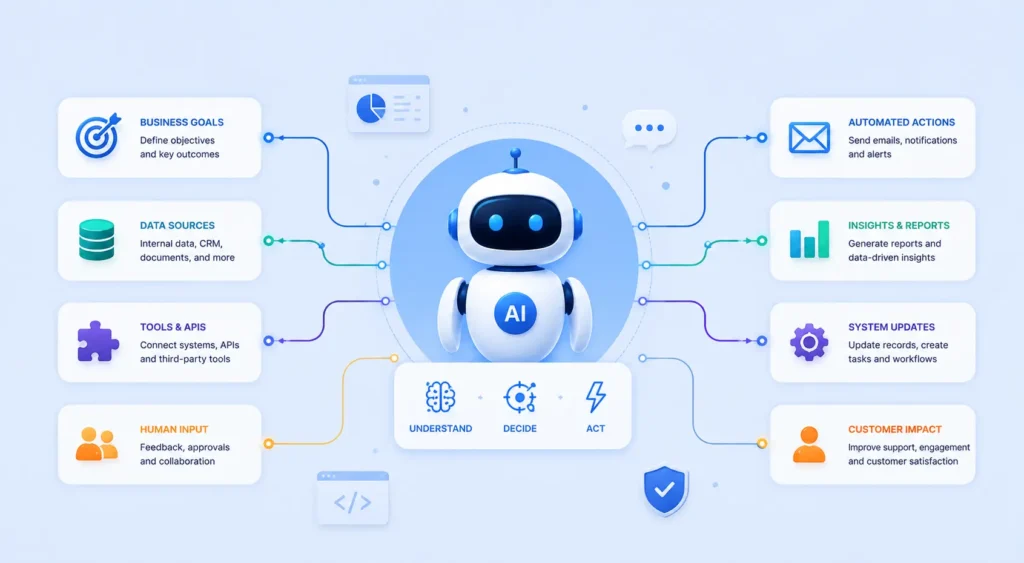
An AI agent is a software system that can understand a goal, reason through a task, access relevant information, use external tools, and take actions to achieve an outcome.
How Does an AI Agent Work?
The simplest way to understand an AI agent is as a system that combines an AI model with business data, tools, instructions, memory, and an execution workflow.
A typical process looks like this:
Business Goal → AI Agent → Reasoning → Data/Knowledge → Tools & APIs → Action → Result
Unlike a conventional chatbot that primarily generates responses, an agent can perform tasks such as checking a CRM record, searching a knowledge base, creating a support ticket, sending an email, or updating an internal system.
| Component | Purpose |
|---|---|
| LLM | Provides language understanding and reasoning |
| Instructions | Defines the agent’s role, objectives, and rules |
| Memory | Maintains relevant context during interactions |
| RAG / Knowledge | Retrieves business-specific information |
| Tools & APIs | Allows the agent to interact with external systems |
| Guardrails | Controls permissions and risky actions |
| Monitoring | Tracks performance, errors, usage, and outcomes |
For example, a customer support agent could receive a question, retrieve information from a company’s knowledge base, check an order through an API, determine the appropriate response, and escalate the issue to a human when necessary.
AI Agents vs Chatbots vs Traditional Automation
The key difference is what the system can understand, decide, and do.
AI Agent vs Chatbot
A chatbot generally focuses on conversation and responding to user questions. An AI agent can go further by using tools, following workflows, making decisions, and completing tasks.
| Capability | Chatbot | Traditional Automation | AI Agent |
|---|---|---|---|
| Understands natural language | ✓ | Limited | ✓ |
| Follows predefined rules | ✓ | ✓ | ✓ |
| Makes contextual decisions | Limited | Limited | ✓ |
| Uses external tools | Limited | ✓ | ✓ |
| Handles multi-step workflows | Limited | Limited | ✓ |
| Takes autonomous action | Limited | ✓ | ✓ |
| Adapts to changing requests | Limited | ✗ | ✓ |
The important point is that businesses do not need an AI agent for every process. Simple repetitive tasks may be better handled by traditional automation, while conversational questions may only require a chatbot.
An agent becomes more valuable when a workflow involves multiple steps, changing context, business data, decision-making, and actions across different systems.
When Should Your Business Build an AI Agent?
Start with the business process, not the AI technology.
What Makes a Good AI Agent Use Case?
A strong AI Agent use case usually has several of these characteristics:
- It happens frequently.
- Employees spend significant time completing it.
- The workflow contains multiple steps.
- Employees need to review information before taking action.
- Relevant business data is available digitally.
- Existing systems provide APIs or integrations.
- The outcome can be measured.
- Some decisions can be automated safely.
- Human approval can be added where required.
For example, instead of asking an AI agent to “help with sales,” a company could define a specific workflow:
New Lead → Research Company → Enrich Lead → Score Lead → Update CRM → Draft Follow-Up → Request Approval
This creates a measurable business process that can be tested and optimized.
When Should You Not Build an AI Agent?
An AI agent may not be the right solution when:
- The task is already solved effectively by simple automation.
- There is insufficient or unreliable business data.
- The process has no measurable business outcome.
- The cost of automation exceeds the value created.
- The workflow requires unrestricted human judgment.
- Existing software already provides the required functionality.
The objective should not be to add AI everywhere. The objective is to use AI where it can create measurable operational or commercial value.
Common AI Agent Use Cases for Businesses
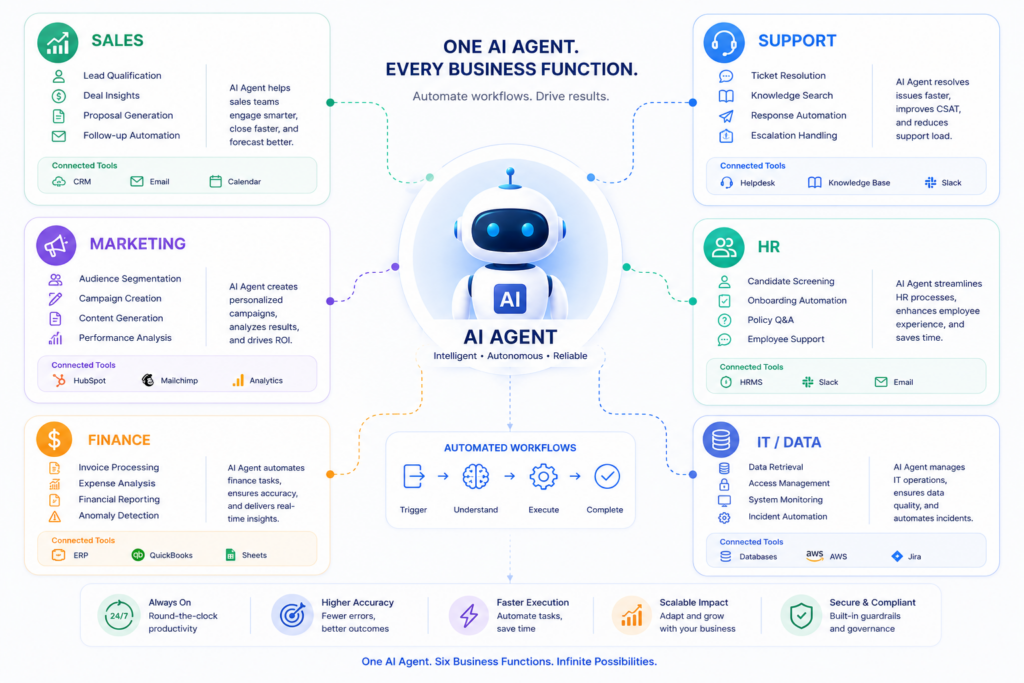
AI agents can support different departments, but the most valuable applications usually focus on repetitive, information-heavy, or multi-step workflows.
Sales AI Agents
Sales agents can help teams:
- Qualify incoming leads
- Research prospects
- Enrich CRM records
- Schedule meetings
- Prepare follow-ups
- Update sales pipelines
- Summarize customer interactions
For example, an agent can receive a new lead, research the company, evaluate available information, update the CRM, and prepare a personalized follow-up for a salesperson.
Customer Support AI Agents
Support agents can:
- Classify incoming tickets
- Search product documentation
- Answer common questions
- Check customer information
- Troubleshoot issues
- Create or update support tickets
- Escalate complex cases
The strongest implementations combine AI reasoning with company-specific knowledge and controlled access to business systems.
Marketing AI Agents
Marketing teams can use agents for:
- Competitor research
- Market research
- Content research
- Campaign analysis
- Keyword research
- Customer segmentation
- Reporting workflows
Instead of generating content alone, an agent can combine research, analysis, data retrieval, and workflow execution.
HR AI Agents
HR workflows can include:
- Resume screening
- Candidate qualification
- Interview scheduling
- Employee FAQs
- Onboarding assistance
- Policy information retrieval
Human approval remains important for sensitive employment decisions.
IT, DevOps and Data Agents
Technical teams can use agents for:
- Incident analysis
- Log investigation
- Ticket classification
- Database queries
- Report generation
- Monitoring workflows
- Troubleshooting assistance
These applications can be particularly valuable when teams work across multiple systems and large volumes of operational data.
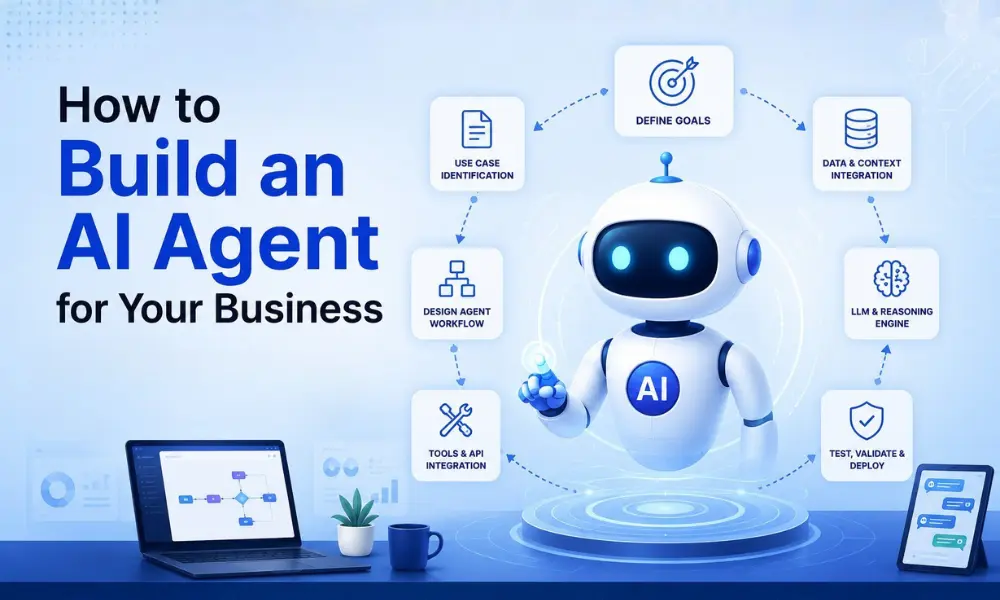
How to Build an AI Agent: Step-by-Step
Building an agent should begin with a clearly defined business objective.
Step 1: Define the Business Problem
Before selecting an LLM, framework, or cloud platform, identify exactly what the agent needs to accomplish.
Instead of:
“We need an AI agent for customer service.”
Define a measurable objective such as:
“We want to automate first-level support requests, retrieve answers from our product knowledge base, and escalate unresolved issues to human agents.”
A specific objective makes it easier to determine the required data, tools, integrations, permissions, and success metrics.
Step 2: Map the Existing Workflow
Document how the process currently works.
Identify:
- What starts the workflow?
- What information is required?
- What decisions are made?
- Which systems are accessed?
- What actions are performed?
- When does a human become involved?
- What defines a successful outcome?
This workflow becomes the foundation for the agent’s architecture.
Step 3: Decide What the Agent Can and Cannot Do
Define clear boundaries before development begins.
For example, a sales agent may be allowed to:
- Read CRM information
- Research prospects
- Draft emails
- Schedule meetings
But it may require human approval before:
- Sending high-value proposals
- Changing customer contracts
- Offering discounts
- Making financial commitments
Clear permissions reduce operational and security risks while keeping the agent useful.
What Components Does an AI Agent Need?
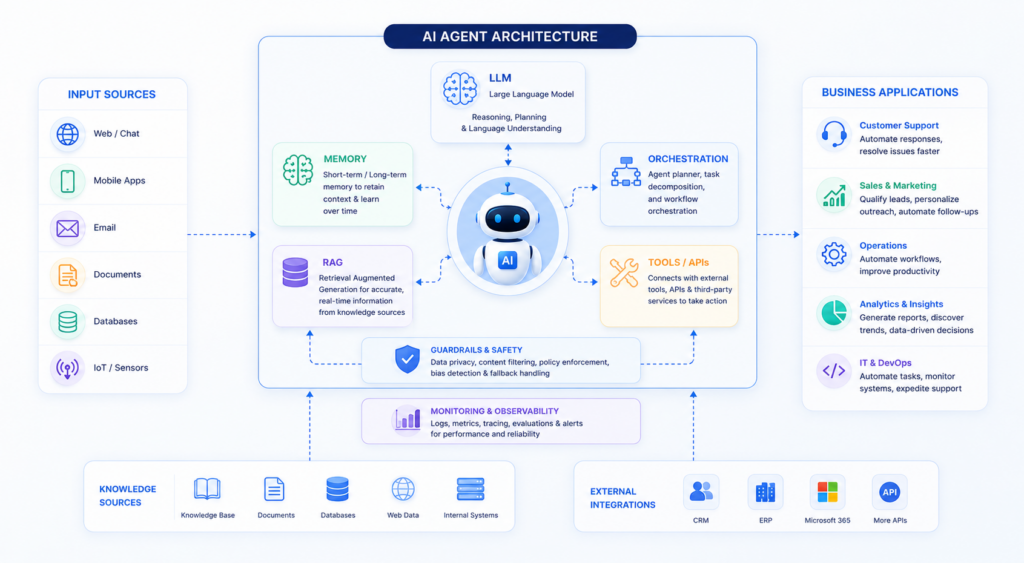
A production-ready agent normally combines several technologies rather than relying on an AI model alone.
Core AI Agent Components
The main components include:
LLM: Provides language understanding and reasoning.
Agent orchestration: Controls how the agent processes tasks and decides which actions to perform.
Knowledge and RAG: Provides access to company-specific information.
Memory: Maintains relevant context during workflows.
Tools and APIs: Allow the agent to interact with CRM, ERP, databases, email, calendars, support systems, and other applications.
Guardrails: Restrict unsafe, unauthorized, or inappropriate actions.
Monitoring: Tracks agent decisions, failures, latency, usage, and costs.
These components work together to turn an AI model into a practical business system rather than simply another conversational interface.
Choosing the Right AI Model
The AI model provides the reasoning and language capabilities behind the agent.
What Should You Consider When Choosing an AI Model?
There is no single model that is best for every business application. The right choice depends on the workflow, reasoning requirements, response speed, data requirements, privacy considerations, and operating cost.
| Factor | Why It Matters |
|---|---|
| Reasoning ability | Helps the agent handle complex business tasks |
| Accuracy | Important for business-critical workflows |
| Context window | Determines how much information the model can process |
| Latency | Affects how quickly the agent responds |
| Cost | Influences ongoing operating expenses |
| Privacy | Important when processing business or customer data |
| Reliability | Helps maintain consistent workflow performance |
Simple tasks may work well with smaller and faster models, while complex workflows may require models with stronger reasoning capabilities.
The model should therefore be selected after defining the workflow, rather than choosing a model first and trying to fit the business process around it.
Connecting Business Data to the AI Agent
An AI agent becomes significantly more useful when it can work with the information your business already uses.
What Business Data Can an AI Agent Access?
Depending on the use case, an agent may connect to:
- CRM records
- ERP systems
- Databases
- Product documentation
- Internal policies
- Customer records
- Support tickets
- Business reports
- Cloud storage
- Emails and calendars
- Internal applications
The goal is not to provide unrestricted access to every business system. Access should be limited to the information required for the agent’s assigned workflow.
For example, a sales agent may need customer information and CRM records but should not automatically have access to payroll or confidential HR information.
Why Does Data Quality Matter?
Poor data can produce poor decisions even when the AI model itself performs well.
Before connecting business data, evaluate:
- Accuracy
- Completeness
- Structure
- Freshness
- Duplicate records
- Access permissions
- Data ownership
A reliable AI agent for business therefore requires data preparation and access control as part of the architecture.
Adding RAG and Business Knowledge
RAG allows an agent to retrieve relevant information before generating a response or taking an action.
What Is RAG in an AI Agent?
Retrieval-Augmented Generation, commonly called RAG, connects an AI system to external knowledge sources so it can retrieve relevant information instead of relying only on information learned during model training.
For example:
Customer Question → Retrieve Product Documentation → Understand Context → Generate Answer
RAG can be useful for:
- Company policies
- Product documentation
- Technical documentation
- Support knowledge bases
- Internal procedures
- Compliance information
- Business documents
For organizations that need a custom knowledge retrieval system, BOSC provides RAG Development Services.
However, RAG and AI agents are not the same thing.
RAG retrieves knowledge. An AI agent can use that knowledge to reason and take action.
For example, a customer-support agent could retrieve a troubleshooting procedure, determine the customer’s issue, check the customer’s account through an API, and create a support ticket if the issue cannot be resolved automatically.
Giving the AI Agent Tools and APIs
Tools allow an agent to interact with external systems and perform actions.
What Can AI Agent Tools Do?
An agent can be connected to tools such as:
- Search
- CRM
- Calendar
- Database
- ERP
- Helpdesk
- Payment systems
- Internal APIs
- Analytics platforms
Consider a sales workflow.
Without tools, AI may provide a recommendation:
“This lead appears highly qualified.”
With the right tools, the agent can:
Research Lead → Check CRM → Score Lead → Update CRM → Schedule Follow-Up → Notify Salesperson
This distinction is fundamental to understanding how agents create business value.
The AI model provides reasoning, while tools give the agent the ability to interact with the real business environment.
Designing the AI Agent Workflow
Once the data and tools are available, define how the agent should process a task.
What Should an AI Agent Workflow Include?
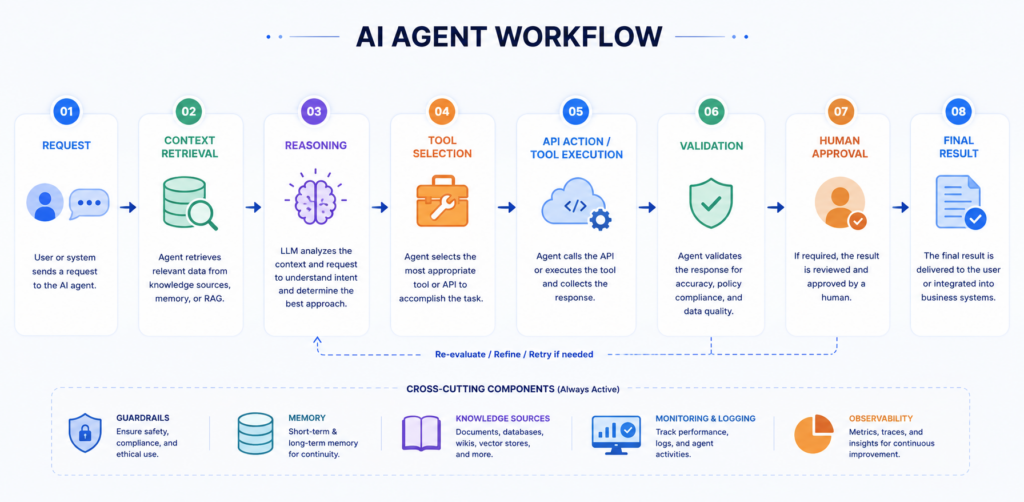
A practical workflow should define:
- Input — What starts the process?
- Context — What information does the agent need?
- Reasoning — What does the agent need to determine?
- Tools — Which systems can it access?
- Decision — What options can it choose?
- Action — What can it execute?
- Validation — How is the result checked?
- Escalation — When should a human take over?
A typical workflow can look like:
Request → Understand → Retrieve Context → Reason → Select Tool → Execute → Validate → Respond or Escalate
The workflow should be designed around the business process rather than around the capabilities of a particular AI model.
Adding Memory and Context
Memory helps an agent maintain useful information during a workflow.
What Is AI Agent Memory?
Memory allows an agent to retain relevant context instead of treating every interaction as a completely new conversation.
For example, a customer-support agent may need to remember:
- The customer’s previous question
- The product involved
- Previous troubleshooting steps
- Account information
- Actions already taken
Memory can operate at different levels.
| Memory Type | Example |
|---|---|
| Session memory | Information from the current conversation |
| Workflow memory | Information retained during a multi-step task |
| Long-term memory | Relevant information retained across interactions |
| Business data | Persistent information stored in CRM, ERP, or databases |
Memory should be carefully controlled. Not every piece of information should be permanently retained.
Adding Human-in-the-Loop Controls
AI agents should not always operate without human oversight.
When Should a Human Approve an AI Agent Action?
Human approval is particularly useful when an action involves:
- Financial transactions
- Legal commitments
- Sensitive customer information
- High-value sales decisions
- Employment decisions
- Security changes
- Irreversible actions
For example:
AI Agent → Prepare Refund → Human Review → Approve → Execute Refund
This approach combines automation with accountability.
Human intervention can also be triggered when the agent encounters uncertainty or a situation outside its defined workflow.
Building AI Agent Security and Guardrails
Security should be designed into the system from the beginning.
What Are AI Agent Guardrails?
Guardrails define what an agent can access, what it can do, and when it must stop or request human intervention.
Important controls include:
- Role-based access
- API permissions
- Tool restrictions
- Data access controls
- Input validation
- Output validation
- Action limits
- Human approval
- Audit logs
- Error handling
- Monitoring
For example, an agent that can read CRM data does not necessarily need permission to delete customer records.
The principle should be simple:
Give the agent only the access it needs to complete its assigned workflow.
This approach helps reduce the impact of incorrect decisions, unauthorized requests, and unexpected agent behavior.
AI Agent Architecture for Business Applications
A production agent typically combines multiple layers.
What Does an AI Agent Architecture Look Like?
A practical architecture can be represented as:
User / Business Event
↓
Agent Interface
↓
Agent Orchestration
↓
LLM / Reasoning
↙ ↓ ↘
Memory | RAG / Knowledge | Tools & APIs
↓
Business Systems
CRM | ERP | Database | Helpdesk | Internal Applications
↓
Validation & Guardrails
↓
Action / Human Approval
↓
Final Result
This architecture separates reasoning, knowledge, execution, and governance rather than placing everything inside a single AI model.
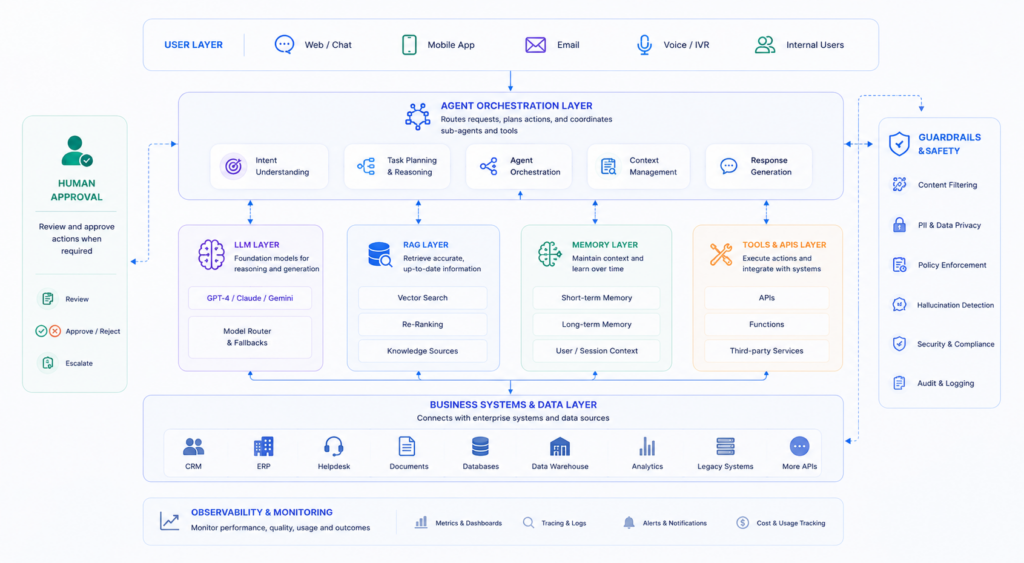
AI Agent Technology Stack
The technology stack should be selected according to the business workflow and existing infrastructure.
Common Technologies Used for AI Agents
| Layer | Common Technologies |
|---|---|
| AI Models | OpenAI, Anthropic, Google Gemini, open-source models |
| Agent Frameworks | LangGraph, LangChain, CrewAI and other orchestration frameworks |
| Backend | Python, Node.js, FastAPI |
| Knowledge / RAG | Vector databases, embeddings, document pipelines |
| Databases | PostgreSQL, MongoDB, cloud databases |
| Integrations | REST APIs, webhooks, SDKs |
| Cloud | AWS, Azure, Google Cloud |
| Monitoring | Logs, traces, evaluations, usage monitoring |
A simple internal knowledge agent does not need the same architecture as a multi-system enterprise agent processing thousands of requests.
The technology should follow the requirements of the workflow rather than the other way around.
Testing the AI Agent Before Production
Testing an AI agent requires more than checking whether it produces a good response.
What Should You Test?
Test the agent against realistic scenarios, including:
- Normal requests
- Ambiguous requests
- Missing information
- Incorrect information
- Unexpected user inputs
- Tool failures
- API failures
- Security restrictions
- Unauthorized requests
- High-volume usage
- Human escalation
For each scenario, evaluate whether the agent:
Understands → Reasons → Uses the Correct Tool → Takes the Correct Action → Produces the Expected Result
Testing should also measure consistency rather than relying on a few successful examples.
Deploying and Monitoring the AI Agent
Development is only one part of the implementation.
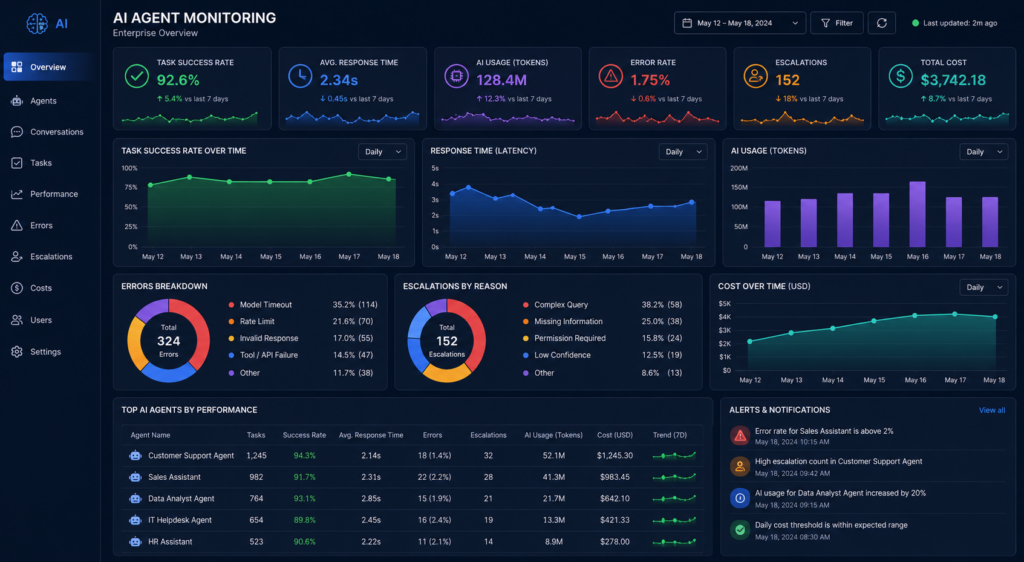
What Should Be Monitored After Deployment?
A production agent should be monitored for:
- Response quality
- Task completion
- Error rate
- Tool failures
- Latency
- Token usage
- Infrastructure cost
- Human escalation
- Security events
- User feedback
Monitoring helps identify problems that may not appear during development.
For example, an agent may perform well during testing but experience increased latency or higher AI usage costs when hundreds of users interact with it simultaneously.
This is why production AI systems require continuous monitoring, evaluation, and optimization.
How Long Does It Take to Build an AI Agent?
The development timeline depends primarily on workflow complexity, integrations, data readiness, testing requirements, and security needs.
What Determines the Development Timeline?
| Project Type | Complexity | Main Requirements |
|---|---|---|
| Basic task agent | Low | One workflow and limited tools |
| Business workflow agent | Medium | Multiple steps and business integrations |
| Multi-system agent | High | Several APIs, data sources, and workflows |
| Enterprise AI agent platform | Very High | Security, governance, scale, and multiple workflows |
A focused single-workflow agent can potentially move from discovery to production in weeks, while larger enterprise implementations require more architecture, integration, testing, security, and rollout planning.
The timeline should therefore be estimated from the scope of the workflow, not from the AI model alone.
How Much Does It Cost to Build an AI Agent?
The AI Agent cost depends on the complexity of the workflow, integrations, data requirements, AI model usage, security, and deployment environment.
What Factors Affect AI Agent Development Cost?
The main factors include:
- Agent complexity: Multi-step workflows require more design and development.
- Number of integrations: CRM, ERP, databases, helpdesk, and internal APIs add development effort.
- RAG and knowledge: Document processing and retrieval systems increase complexity.
- AI model usage: Model selection and request volume affect ongoing costs.
- Security: Enterprise authentication, authorization, data protection, and audit requirements add implementation work.
- User interface: A backend agent requires less interface development than a complete application.
- Monitoring: Production observability, logging, evaluation, and cost tracking are important for reliable operation.
| AI Agent Type | Complexity | Typical Requirements |
|---|---|---|
| Basic task agent | Low | One workflow and limited tools |
| Business workflow agent | Medium | Multiple steps and integrations |
| Multi-system agent | High | Multiple APIs, data sources, and workflows |
| Enterprise AI agent platform | Very High | Security, governance, scalability, and multiple agents |
There is no universal price for an AI agent because every business workflow is different. A realistic estimate should be based on the workflow, integrations, data, security requirements, and expected usage.
Businesses looking for a custom solution can explore BOSC’s AI Agent Development Services for architecture, development, integrations, deployment, and optimization.
Measuring AI Agent ROI
An AI agent should be evaluated by business outcomes, not simply by the quality of its responses.
Which Metrics Should Businesses Track?
| KPI | What It Measures |
|---|---|
| Task completion rate | How often the agent successfully completes a workflow |
| Time saved | Reduction in manual employee effort |
| Cost per task | Operational cost of completing each workflow |
| Response time | How quickly the process is completed |
| Human escalation rate | How often human intervention is required |
| Accuracy | Quality and correctness of results |
| Conversion rate | Business impact for sales and marketing agents |
| Customer satisfaction | Impact on customer experience |
For example, a customer-support agent may create value by reducing resolution time, lowering repetitive ticket volume, and allowing support teams to focus on complex customer issues.
The strongest implementations connect technical metrics with measurable business objectives.
Common AI Agent Development Challenges
AI agents can automate complex workflows, but they also introduce technical and operational challenges.
What Are the Biggest AI Agent Challenges?
Hallucinations: The agent may generate incorrect information or make an incorrect decision.
Poor data quality: Inaccurate or outdated business information can lead to unreliable results.
Integration failures: APIs and external systems can fail or return unexpected data.
Security risks: Excessive permissions can create unnecessary business risk.
Unpredictable behavior: Complex workflows can produce unexpected results if instructions and boundaries are unclear.
AI costs: High usage can increase operational expenses without proper monitoring.
Latency: Multiple reasoning steps and API calls can increase response time.
Lack of monitoring: Without observability, businesses may not know why an agent failed or how it is performing.
These risks can be reduced through structured workflows, restricted permissions, testing, human approval, monitoring, and continuous optimization.
AI Agent Implementation Roadmap
A phased approach makes it easier to validate business value before expanding the system.
Phase 1: Discovery
Identify the business problem, workflow, users, systems, data sources, risks, and expected outcome.
Phase 2: Proof of Concept
Build a focused version around one clearly defined workflow and validate whether it can produce the expected result.
Phase 3: MVP Development
Connect real business data, APIs, tools, authentication, and the required interface.
Phase 4: Testing and Security
Test real-world scenarios, edge cases, permissions, failures, accuracy, and performance.
Phase 5: Production Deployment
Deploy the agent with monitoring, logging, access controls, and operational processes.
Phase 6: Optimization and Scaling
Measure performance, improve workflows, optimize AI usage, and introduce additional use cases after the initial implementation proves its value.
This approach allows businesses to start with a measurable problem instead of attempting to automate an entire organization at once.
Conclusion: Build an AI Agent Around a Real Business Problem
The most effective AI projects do not begin with the question, “What can AI do?”
They begin with:
“Which business process can we improve with AI?”
From there, businesses can define the workflow, select the right AI model, connect relevant data, provide tools and APIs, establish guardrails, test the system, and continuously measure its results.
A successful AI agent for business should do more than generate intelligent responses. It should help people complete work faster, reduce repetitive effort, improve decision-making, and create measurable business value.
Whether the goal is automating customer support, qualifying sales leads, analyzing business data, assisting employees, or connecting multiple enterprise systems, the right architecture and implementation strategy are critical.
Ready to Build an AI Agent for Your Business?
BOSC Tech Labs helps businesses move from AI strategy and workflow discovery to AI agent architecture, development, RAG, API integrations, testing, deployment, and monitoring.
If you have a business workflow that could benefit from intelligent automation, start by identifying the process, expected outcome, data sources, and systems involved. From there, an AI agent can be designed around your actual business requirements rather than forcing your workflow into a generic AI solution.
FAQ
Direct answers help businesses and search systems quickly understand the most important questions around AI agent development.
1. What is an AI agent?
An AI agent is a software system that can understand a goal, reason through tasks, access information, use tools or APIs, and take actions to complete a workflow.
2. How do I build an AI agent for my business?
Start by identifying a measurable business problem, map the workflow, select an appropriate AI model, connect business data and tools, define permissions, test real-world scenarios, and deploy the agent with monitoring.
3. Can an AI agent connect to existing business software?
Yes. AI agents can connect to CRM, ERP, databases, helpdesk platforms, email, calendars, analytics systems, and other applications through APIs, SDKs, webhooks, or integrations.
4. How much does it cost to build an AI agent?
There is no fixed cost. Development depends on workflow complexity, integrations, data requirements, AI model usage, security, interface requirements, and deployment needs.
5. Can one business use multiple AI agents?
Yes. Businesses can use specialized agents for sales, customer support, marketing, finance, IT, and data operations. These agents can operate independently or as part of a larger multi-agent system.