Introduction
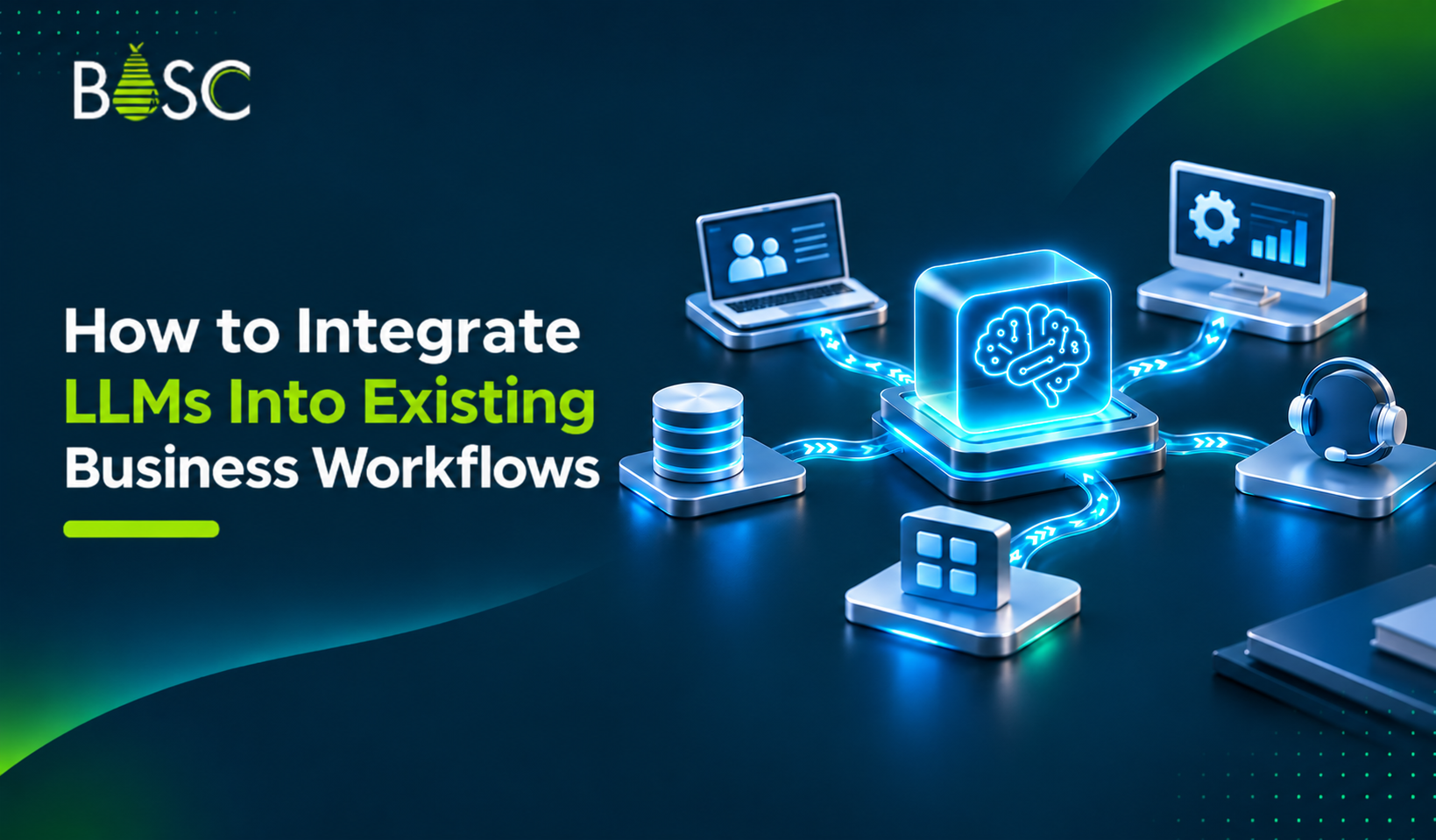
Businesses are increasingly using artificial intelligence to improve daily operations, manage information, and reduce repetitive tasks. Large Language Models (LLMs) are making this possible by helping organizations understand text, generate content, summarize information, answer questions, and support decision-making.
However, adopting an LLM does not always mean building an entirely new system. Businesses can connect these models with the tools and applications they already use. LLM integration allows organizations to bring AI capabilities into existing workflows, such as customer support, sales, human resources, finance, and internal knowledge management.
For example, an organization can connect an LLM with its CRM system to summarize customer conversations, help employees find information, or draft follow-up emails. These capabilities can improve productivity without requiring teams to change their entire working process.
In this guide, we will explain how to integrate LLMs into existing business workflows, explore practical use cases, and discuss the steps and challenges involved in implementation.
What Does It Mean to Integrate LLMs Into Business Workflows?
Integrating an LLM into a business workflow means connecting a language model with existing software, applications, databases, and business processes so it can perform specific tasks.
An LLM can process information, understand user requests, generate responses, and assist with tasks that previously required manual effort. When connected to business systems, it can work with relevant organizational data and support employees across different departments.
For example, consider a customer support team that receives hundreds of customer queries every day. Employees may need to review previous conversations, check order details, and prepare responses.
An integrated LLM solution can:
- Understand incoming customer questions.
- Retrieve relevant information from connected systems.
- Generate suggested responses.
- Summarize previous customer interactions.
- Help support agents resolve queries faster.
The LLM does not necessarily replace the existing customer support platform. Instead, it adds AI capabilities to the system.
This approach helps businesses improve their current processes while continuing to use the applications their teams already understand.
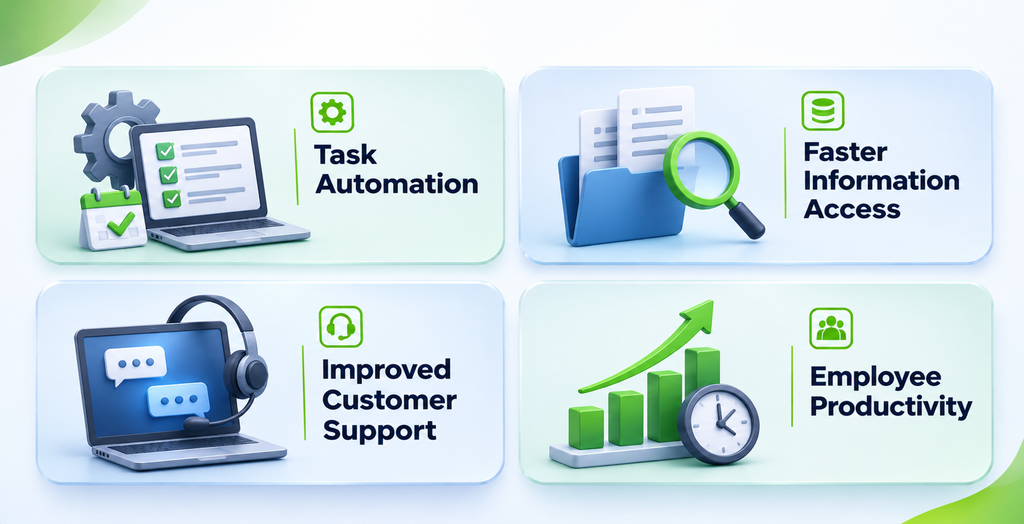
Why Should Businesses Integrate LLMs Into Existing Workflows?
LLM integration can provide several operational benefits when implemented around clear business requirements.
1. Reduce Repetitive Manual Tasks
Employees often spend significant time writing emails, summarizing documents, searching for information, and preparing reports.
An LLM can assist with these repetitive activities by generating drafts, extracting important details, and summarizing large amounts of text. Employees can then spend more time on tasks that require judgment and expertise.
2. Improve Access to Business Information
Business information is often spread across different platforms, documents, and databases. Finding the right information can take time.
When connected to approved internal data sources, an LLM-powered solution can help employees search for information using natural language.
For example, an employee could ask, “What is the current status of this customer account?” The system can retrieve relevant information from connected business applications, depending on the permissions and integrations configured.
3. Support Better Customer Experiences
LLMs can help customer support teams understand queries, summarize customer history, and prepare relevant responses.
When integrated with CRM and support platforms, they can provide employees with useful context before they respond to customers.
4. Improve Team Productivity
Employees can use LLM-powered tools to draft documents, summarize meetings, organize information, and find answers to common questions.
This can reduce time spent switching between applications and manually processing information.
7 Practical Ways to Integrate LLMs Into Business Workflows
LLMs can support different departments depending on the organization’s processes, available data, and technology requirements.
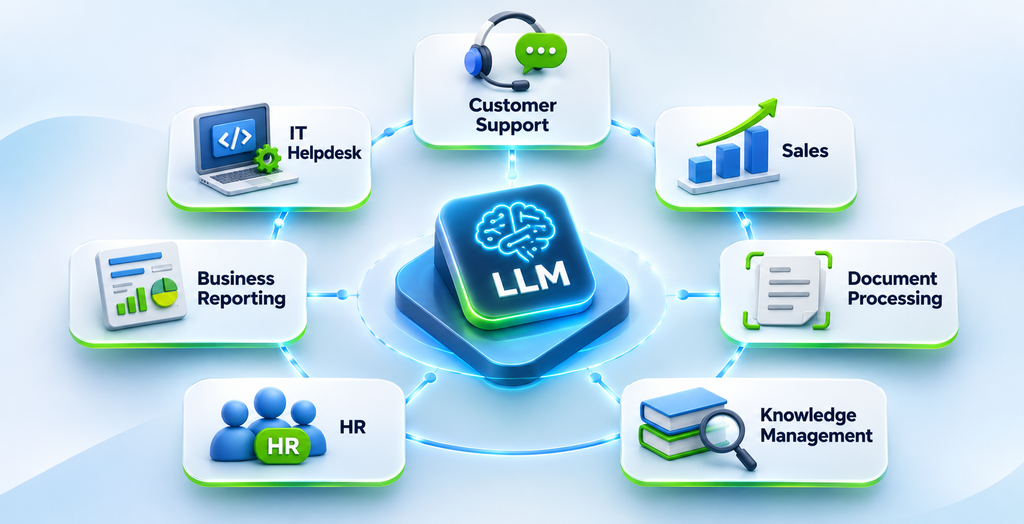
Here are seven practical applications.
1. Customer Support Automation
Customer support teams handle a high volume of questions about products, services, payments, and account information.
An LLM can be connected to customer support software to understand incoming queries and generate relevant responses.
It can also summarize previous conversations and suggest possible solutions to support agents.
For example, when a customer asks about an order, the system can retrieve order information from an integrated platform and prepare a response based on the available data.
Sensitive requests and complex issues should still be directed to human employees when required.
2. Sales and CRM Assistance
Sales teams manage customer information, follow-ups, meeting notes, and sales opportunities.
An LLM connected to a CRM system can help sales representatives:
- Summarize customer interactions.
- Draft follow-up emails.
- Prepare meeting summaries.
- Extract important details from sales conversations.
- Organize customer information.
This allows sales teams to spend less time on administrative work and more time building customer relationships.
3. Document Processing and Management
Businesses handle different types of documents, including contracts, invoices, reports, proposals, and internal policies.
LLMs can help extract information, summarize documents, classify content, and answer questions based on document information.
For example, an employee could upload a contract and ask the system to identify payment terms, important dates, or specific clauses.
For high-impact legal and financial decisions, extracted information should be reviewed by qualified employees.
4. Internal Knowledge Management
Employees frequently search for company policies, technical documentation, project information, and internal guidelines.
An LLM-powered knowledge assistant can connect to approved company documents and help employees find relevant information through natural language questions.
For example, an employee could ask, “What is our process for requesting project approval?” The system can retrieve the relevant internal guidelines and provide a summary.
This can make organizational knowledge easier to access.
5. Human Resources Support
HR teams manage employee questions, onboarding documents, recruitment information, and company policies.
An LLM can support HR workflows by answering common policy questions, summarizing resumes, drafting job descriptions, and helping organize onboarding information.
For example, new employees can use an internal AI assistant to understand leave policies, onboarding steps, and workplace guidelines.
Recruitment-related outputs should be reviewed by HR professionals. AI should not independently make employment decisions.
6. Report Generation and Business Analysis
Preparing reports often involves collecting information from multiple sources and organizing it into a readable format.
LLMs can help summarize reports, explain trends, generate written insights, and prepare initial drafts using approved business data.
For example, a management team could use an integrated AI assistant to summarize sales reports and highlight important changes.
Numerical calculations and business metrics should be validated using reliable data systems rather than relying only on generated text.
7. IT Helpdesk and Technical Support
IT departments receive regular requests related to password access, software issues, system configuration, and troubleshooting.
An LLM integrated with an IT service management platform can classify support tickets, summarize reported problems, suggest troubleshooting steps, and help employees find technical documentation.
For example, when an employee reports a software issue, the system can review the description and suggest relevant troubleshooting instructions from the company’s knowledge base.
How to Integrate LLMs Into Existing Business Workflows: Step-by-Step Process
Successful implementation requires more than selecting a language model. Businesses must understand their current workflows, identify the right use cases, prepare data, and establish secure connections with existing systems.
Here are seven important steps.
Step 1: Identify Business Requirements
Start by identifying the business problems you want to solve.
Review existing workflows and find tasks that involve repetitive communication, information retrieval, document processing, or content generation.
For example:
- Does your support team spend too much time answering similar questions?
- Do employees struggle to find internal information?
- Does your sales team manually prepare follow-up emails?
- Does your finance team process large volumes of documents?
Choose a use case where an LLM can provide measurable value.
Avoid integrating AI into every department at once. Start with one clearly defined business process.
Step 2: Evaluate Your Existing Technology
Before implementation, review the software and infrastructure your organization already uses.
This may include:
- Customer Relationship Management (CRM) systems.
- Enterprise Resource Planning (ERP) platforms.
- Customer support applications.
- Document management systems.
- Internal databases.
- Communication and collaboration tools.
Check whether these systems provide APIs, webhooks, or other integration options.
Understanding your existing technology helps determine how the LLM will access information and interact with business applications.
Step 3: Select the Right LLM
Different language models offer different capabilities, costs, performance levels, and deployment options.
Your selection should depend on the intended use case.
Consider these factors:
- Accuracy: Can the model handle the tasks your business requires?
- Data privacy: Does the provider support your organization’s data protection requirements?
- Integration support: Can the model connect with your existing applications?
- Scalability: Can it support your expected usage?
- Cost: Does the pricing fit your operational budget?
- Deployment: Do you need a cloud-based, private, or self-hosted solution?
Test suitable models with real business examples before making a final decision.
Step 4: Prepare and Organize Business Data
LLMs need relevant information to provide useful responses about your business.
Identify the data sources required for your selected workflow. These may include internal documents, customer records, product information, policies, and knowledge bases.
Before connecting these sources, review their quality and structure.
Important preparation activities include:
- Removing duplicate and outdated information.
- Organizing documents into searchable formats.
- Applying access permissions.
- Identifying confidential information.
- Establishing data update processes.
For many enterprise applications, Retrieval-Augmented Generation (RAG) can help an LLM retrieve relevant information from approved business data before generating a response.
Step 5: Build the Integration Layer
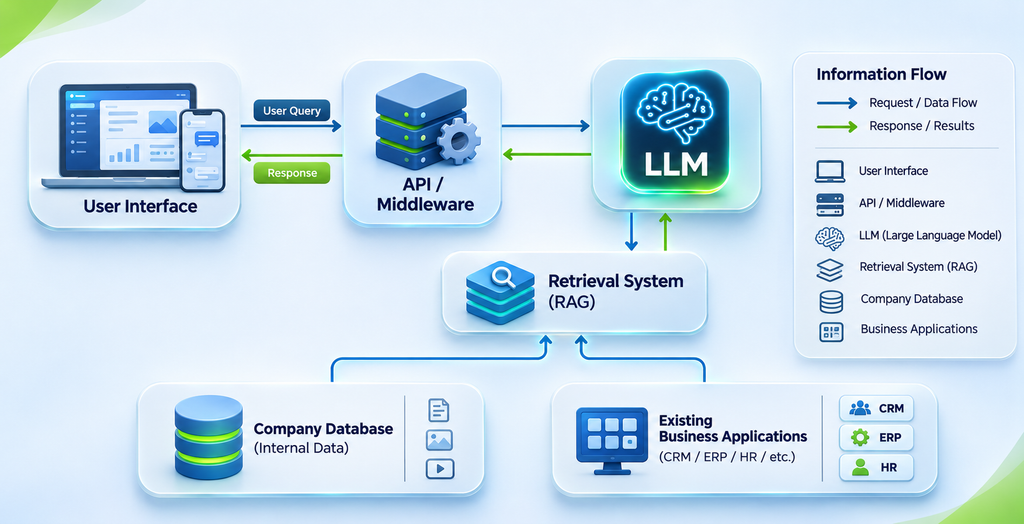
The integration layer connects the LLM with your existing business applications.
Depending on the requirements, this layer may include APIs, middleware, workflow automation tools, authentication systems, and data retrieval components.
A typical integration process may work like this:
- An employee submits a request through an existing business application.
- The application sends the request to the integration layer.
- The integration layer retrieves relevant information from approved systems.
- The LLM processes the request and generates an output.
- The application displays the response or sends it for employee review.
- Approved actions are passed to the relevant business system.
For example, an LLM connected to a CRM can summarize customer information and prepare a follow-up email. The sales representative can review and approve the email before it is sent.
Step 6: Test the Integration
Before making the solution available to employees, test it with real-world scenarios.
Check whether the LLM:
- Understands different types of user requests.
- Retrieves the correct business information.
- Generates relevant and accurate responses.
- Handles incomplete or unclear requests.
- Follows access permissions.
- Works correctly with connected applications.
Also test how the system responds when an application is unavailable or the required information cannot be found.
For important business operations, include human approval before the system performs sensitive actions.
Step 7: Deploy, Monitor, and Improve
After testing, introduce the solution gradually.
Start with a limited group of users or one department. Collect feedback and monitor how the integration performs.
Track useful metrics such as:
- Time saved per task.
- Response accuracy.
- Number of tasks successfully completed.
- Employee adoption.
- Cost per request.
- Error and escalation rates.
Use these insights to improve prompts, data retrieval, workflows, and system configurations.
LLM integration should be treated as an ongoing process rather than a one-time implementation.
Common Challenges in LLM Integration
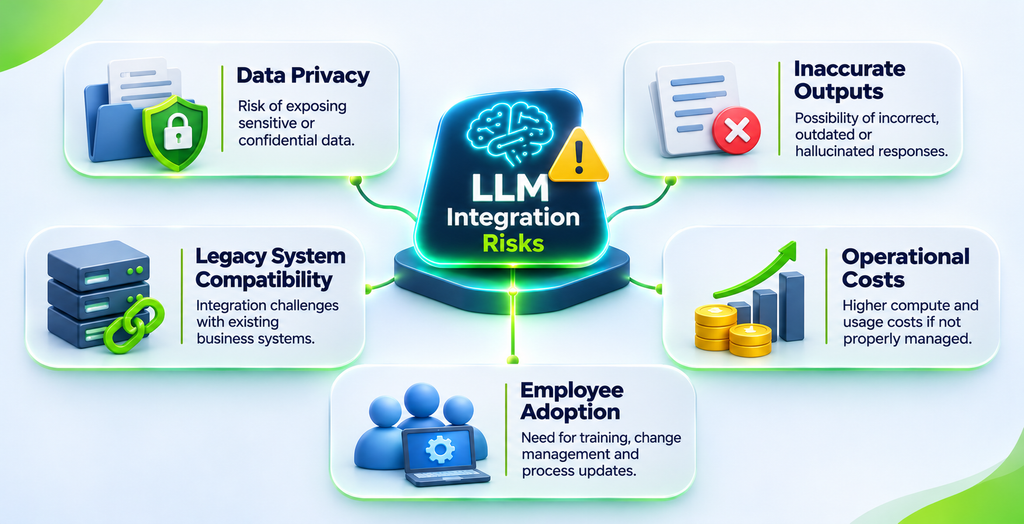
Although LLMs offer useful capabilities, businesses may face technical and operational challenges during implementation.
1. Data Privacy and Security
Business systems may contain confidential information, customer records, and sensitive documents.
Connecting an LLM to these systems requires clear data access policies, authentication, encryption, and appropriate security controls.
Organizations should also review the data handling and retention policies of their selected model provider.
2. Inaccurate or Unsupported Responses
LLMs can sometimes generate incorrect information or responses that are not supported by available data. This is commonly referred to as hallucination.
Businesses can reduce this risk by using reliable data sources, retrieval-based approaches, clear instructions, output validation, and human review for important tasks.
3. Integration With Legacy Systems
Some organizations rely on older applications that may not provide modern APIs or straightforward integration options.
Connecting an LLM with these systems may require middleware, custom connectors, or changes to the existing infrastructure.
4. Integration Costs
Implementation costs depend on model usage, infrastructure, development requirements, data preparation, and ongoing maintenance.
Businesses should estimate both initial and operational costs before deployment.
5. Employee Adoption
Employees may hesitate to use AI-powered tools if they do not understand how they work or how the tools affect their responsibilities.
Training, clear usage guidelines, and employee feedback can help improve adoption.
Best Practices for Successful LLM Integration
Following a structured approach can help organizations build reliable and maintainable LLM-powered workflows.
Start With a Specific Use Case
Choose a workflow where the expected benefit can be measured. A focused implementation is easier to test, improve, and expand.
Keep Human Oversight Where Needed
LLMs can assist with business decisions, but they should not independently handle every high-impact activity. Add human approval for sensitive financial, legal, customer, and operational actions.
Protect Business Data
Use role-based access controls, secure APIs, encryption, and data governance policies. Ensure the LLM only receives information that the user or workflow is authorized to access.
Use Reliable Data Sources
Connect the model to relevant and updated business information. For knowledge-based applications, consider RAG to retrieve supporting information before generating answers.
Monitor Performance Regularly
Track accuracy, response time, costs, errors, and user feedback. Regular monitoring helps identify issues and improve the solution.
Plan for Scalability
Design the integration so that additional departments, applications, and workflows can be supported without rebuilding the entire system.
How BOSC Tech Labs Can Help With LLM Integration
Integrating an LLM into an existing business environment requires the right combination of AI expertise, software development, data management, and system integration.
BOSC Tech Labs helps businesses explore and develop AI-powered solutions based on their operational requirements.
From Generative AI and AI agent development to intelligent automation, businesses can work with an experienced technology team to identify practical opportunities for AI adoption.
BOSC Tech Labs can support organizations with:
- Generative AI Development: Build AI-powered applications that generate and process business content.
- AI Agent Development: Develop AI agents that can support multi-step tasks and interact with connected tools. Explore AI Agent Development services.
- Intelligent Automation: Reduce repetitive work by connecting AI capabilities with business processes.
- Computer Vision: Develop solutions that analyze and interpret visual information.
- Predictive Analytics: Use data-driven insights to support business planning and decisions.
The right implementation depends on your existing technology, data requirements, security needs, and business objectives.
Visit BOSC Tech Labs to explore AI development solutions for your business.
Frequently Asked Questions
1. What is LLM integration?
LLM integration is the process of connecting a Large Language Model with existing business applications, databases, and workflows. It allows organizations to use AI capabilities such as text generation, summarization, information retrieval, and task assistance within their current systems.
2. Can LLMs be integrated with existing business software?
Yes. LLMs can be connected with CRM, ERP, customer support platforms, document management systems, and internal applications. The integration method depends on the software’s available APIs, security requirements, and technical infrastructure.
3. What is the role of RAG in LLM integration?
Retrieval-Augmented Generation (RAG) allows an LLM to retrieve relevant information from external or internal data sources before generating a response. It can help businesses provide more contextually relevant answers based on their own documents and knowledge bases.
4. How long does it take to integrate an LLM into a business workflow?
The timeline depends on the complexity of the workflow, data readiness, existing software, integration requirements, and security considerations. A simple proof of concept may take less time than a complete enterprise integration involving multiple systems.
5. Is LLM integration secure for enterprise applications?
LLM integration can be designed with enterprise security requirements in mind. Organizations should implement appropriate access controls, encryption, data governance, monitoring, and provider-level security reviews. The exact level of security depends on the solution architecture and deployment model.
Conclusion
Integrating LLMs into existing business workflows allows organizations to introduce AI capabilities without replacing their entire technology infrastructure.
From customer support and sales assistance to document processing and internal knowledge management, LLMs can help businesses reduce repetitive work and improve access to information.
However, successful implementation requires clear business goals, suitable model selection, reliable data, secure integrations, and continuous monitoring.
By starting with a specific use case and expanding gradually, businesses can build practical AI-powered workflows that support their teams and long-term operational goals.