

Many operational problems are visible long before they appear in a report. Computer vision gives businesses a way to catch those signals while there is still time to act. For leaders, the business value lies in fewer manual checks, faster exception handling, better quality control, stronger safety oversight, and less rework across teams and locations.
It also helps organizations scale processes that depend heavily on human observation without losing control as volumes increase. While computer vision applications show where the technology can be deployed, its use cases reveal the specific operational problems it can solve. This distinction helps businesses focus on where the technology can deliver practical value.
This blog explains the latest computer vision applications across industries like healthcare, manufacturing, and sports, how they are being used, and how each use case is changing day-to-day operations.
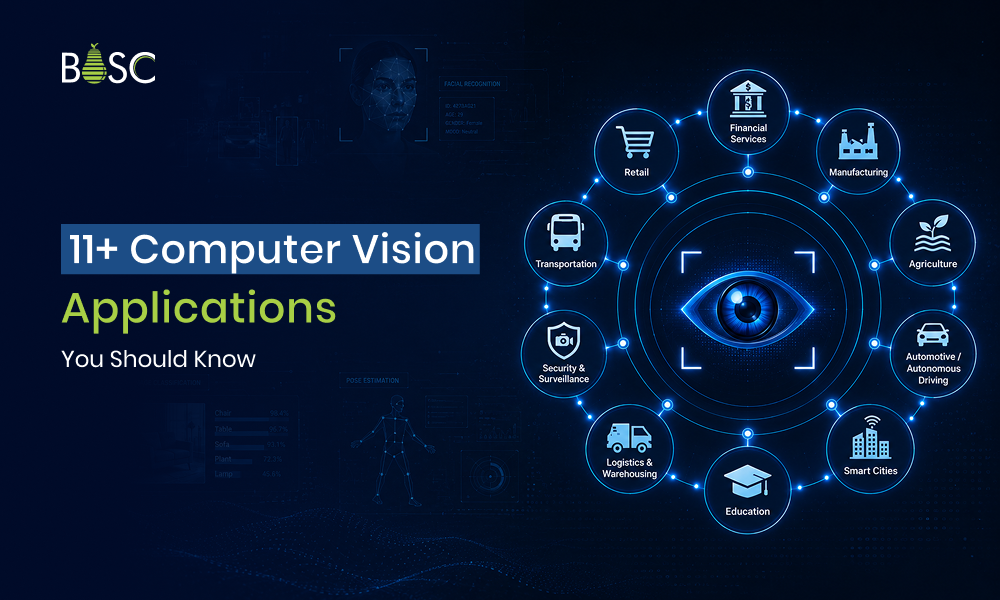
15 Computer Vision Applications and Use Cases
From prioritizing medical scans and rejecting defective parts to tracking players and indexing media, these latest computer vision applications are changing day-to-day operations.
Industry 1: Healthcare and Life Sciences
The applications of computer vision in healthcare are most established in image-heavy workflows where a small visual detail can change what clinicians examine next.
1. Medical Image Analysis and Diagnostic Support
Medical imaging is one of the most established applications of computer vision in healthcare, with FDA-authorized tools already used across radiology and other clinical specialties.
Application use cases:
- Screening X-rays for potential fractures, lung conditions, or other abnormalities
- Locating and measuring tumors or lesions in CT and MRI scans
- Identifying suspicious areas in mammograms, ultrasounds, and retinal images
- Comparing follow-up scans to track disease progression or treatment response
Operational response: The findings appear within the clinician’s review process as marked regions, measurements, or case-level alerts. This gives specialists a clearer starting point while keeping diagnosis and treatment decisions in their hands.
2. Digital Pathology and Microscopic Cell Analysis
Digitized slides enable vision systems to examine tissue at scales that would be difficult to review uniformly by eye, from individual cells to entire tumor regions. Slide imaging via AI-based digital pathology encompasses tumor recognition, biomarker assessment, and whole-slide analysis, while also underscoring the need for consistent slide preparation and reliable datasets.
Application use cases:
- Locating potentially cancerous regions across whole-slide images
- Counting cells, mitotic figures, or visible biomarkers
- Separating healthy, inflamed, and abnormal tissue areas
- Measuring how much of a sample contains a particular tissue pattern
Operational response: Relevant regions and measurements are organized for the pathologist before final interpretation, and unusual cases are routed for closer review.
3. Surgical Guidance and Procedure Monitoring
Surgical video can be analyzed for anatomy, instruments, actions, and procedure stages. However, these computer vision use cases remain an emerging area, with research suggesting that most studies remain retrospective and lack testing during live procedures.
Application use cases:
- Identifying instruments and visible anatomical structures during minimally invasive surgery
- Recognizing the current stage of a procedure from the video feed
- Tracking instrument movement around nerves, vessels, or other sensitive areas
- Tagging bleeding events, critical steps, or deviations for later review
Operational response: The analysis can support on-screen overlays, timely prompts, procedure timestamps, and structured surgical records. For now, these outputs are best used to assist the surgical team rather than make independent clinical decisions.
Businesses exploring imaging-led clinical workflows can learn how BOSC approaches secure, compliant medical support systems through its healthcare software solutions.
Industry 2: Manufacturing
In manufacturing, computer vision use cases are moving closer to the production line, where a quality issue can be caught at the station that created it before the problem travels downstream.
4. Surface Defect and Anomaly Detection
Visual inspection systems examine each product against known quality standards and look for irregularities that do not match predefined defect classes.
Application use cases:
- Finding scratches, cracks, dents, discoloration, contamination, and coating inconsistencies
- Inspecting reflective, textured, or uneven surfaces from multiple angles
- Identifying unfamiliar anomalies that differ from acceptable production samples
Operational response: Each finding can be linked to the affected unit and production stage. The quality-control process may reject the item, send it for secondary inspection, or trace recurring faults back to a machine setting or material batch.
5. Assembly and Component Verification
Here, the question is not whether a part is damaged, but whether the right components are present, correctly placed, and ready for the next step.
Application use cases:
- Confirming the presence of screws, connectors, cables, seals, and other required parts
- Checking component orientation, alignment, and spacing against an approved assembly
- Verifying PCB placement, wiring sequences, or product config before final assembly
Operational response: A mismatch can prevent the unit from advancing, generate a rework instruction, or require operator approval before production resumes. This inspection keeps incomplete assemblies from reaching end-of-line testing or shipment.
6. Packaging, Label, and Fill-Level Inspection
Final inspection shifts attention from the product itself to what surrounds it: the seal, label, printed code, and quantity inside the package.
Application use cases:
- Checking caps, seals, cartons, and tamper-evident packaging for visible faults
- Reading lot numbers, expiration dates, barcodes, and other printed identifiers
- Measuring fill levels and verifying label position, orientation, and print quality
Operational response: Nonconforming packages can be removed before palletizing, while inspection records help teams identify a misaligned labeler or a recurring sealing problem.
For a broader view of how visual inspection can connect with production, quality, and traceability, explore BOSC’s manufacturing software solutions
Industry 3: Sports and Fitness
Computer vision applications in sports turn match and training footage into positional, technical, and decision-ready data that teams can review beyond what the camera shows at first glance.
7. Player and Ball Tracking
Player and ball tracking maps how a game unfolds by following movement, spacing, speed, and trajectories across successive frames. Leading computer vision use cases include multi-object tracking, motion prediction, tactical analysis, and event detection.
Application use cases:
- Following each player’s position and movement throughout a match
- Tracing ball speed, direction, bounce, and flight path
- Measuring team shape, player spacing, runs, and defensive coverage
- Linking tracked movement to passes, shots, turnovers, or other match events
Operational response: The captured data can populate tactical dashboards, generate player heat maps, and surface relevant sequences for post-match review. Coaches and analysts can then study how a formation shifted, or what led to a decisive passage of play.
8. Technique and Movement Analysis
Markerless motion analysis uses regular or multi-angle video to study body position and movement without attaching sensors to the athlete. It is mostly used in training, biomechanics, and exercise analysis, though camera angle and high-speed motion can still affect reliability.
Application use cases:
- Reviewing a batter’s stance, backlift, footwork, and follow-through
- Breaking down a bowler’s run-up, release point, and body alignment
- Examining a runner’s stride, joint angles, and movement sequence
- Comparing exercise form or rehabilitation movements across sessions
Operational response: The analysis can create joint overlays, side-by-side comparisons, and tagged moments for the coach or practitioner. This makes visible changes easier to review while keeping technical interpretation with the person guiding the athlete.
9. Officiating and Line-Decision Support
These applications combine synchronized camera views, spatial tracking, and event reconstruction to support calls that depend on exact position or timing. FIFA has confirmed that advanced semi-automated offside technology will be used at the 2026 World Cup, including more detailed player identification and tracking through 3D representations.
Application use cases:
- Establishing an attacker’s position at the moment the ball is played
- Checking whether a ball crossed a goal line, boundary, crease, or court line
- Reconstructing close-contact or out-of-bounds moments from multiple angles
- Creating visual evidence for video-review officials
Operational response: The technology provides a measured view of the incident, giving officials a reconstructed sequence, a positional alert, or a line visualization that can shorten review time and make the basis of the decision easier to communicate.
BOSC has applied these capabilities in a cricket video intelligence platform that uses player tracking, motion analysis, automated clipping, and coaching workflows. Read the CricVision case study or explore BOSC’s broader sports technology solutions
Industry 4: Media and Publishing
Media and publishing teams widely use computer vision for visual analysis to make large content libraries searchable and convert complex printed material into clear digital assets.
10. Visual Asset Indexing and Video Search
This application organizes images and footage by what appears in them, making large archives easier to search, review, and reuse.
Application use cases:
- Identifying people, objects, logos, and locations across image and video libraries
- Detecting key moments in news, sports, interviews, and entertainment footage
- Matching new content with visually similar assets already stored in an archive
- Adding searchable tags and timestamps to long-form or live video
Operational response: Editors can move directly to relevant frames or clips instead of reviewing entire recordings. Approved assets can then be prepared for publishing, licensing, repackaging, or distribution, while uncertain matches remain available for editorial verification.
11. Document Layout Analysis and Archive Digitization
Unlike basic text extraction, this computer vision use case preserves the relationships between headlines, columns, images, captions, tables, and body copy on the page.
Application use cases:
- Separating headlines, articles, images, captions, tables, and advertisements in scanned publications
- Reconstructing the correct reading order in newspapers, magazines, and multi-column reports
- Converting books, journals, and historical documents into searchable digital records
- Linking photographs, illustrations, or charts with their related captions and text
Operational response: The extracted content can enter a publishing platform or digital archive with its original structure intact. Pages with unclear layouts, damaged scans, or misprinted text can be routed for review before publication or indexing.
Publishers evaluating visual search or archive digitization can explore how BOSC builds connected workflows through its media and publishing solutions
Industry 5: Automotive and Mobility
Automotive safety is shaped by two views: what is happening on the road and whether the driver is prepared to respond. Computer vision applications support incidents in multiple ways.
12. Road-Scene Perception for Driver Assistance
Road-scene perception identifies lanes, road users, signs, and hazards around a moving vehicle. NHTSA’s 2026 ADAS evaluations now include pedestrian emergency braking, lane-keeping assistance, and blind-spot intervention.
Application use cases:
- Recognizing pedestrians, cyclists, vehicles, and obstacles at intersections or along the vehicle’s path
- Reading lane markings, traffic signs, signals, and temporary changes around work zones
- Tracking the distance and movement of nearby road users to identify a possible collision path
- Monitoring blind spots and rear cross traffic during lane changes or reversing
Operational response: Depending on the level of assistance, the vehicle may warn the driver, apply the brakes, or make a limited steering correction. These features support the drive, but they do not absolve the driver of their responsibility to remain attentive and in control.
13. Driver and Cabin Monitoring
This computer vision use case turns the camera inward to assess driver engagement and cabin conditions. Modern safety protocols also include direct driver monitoring and occupant status checks during the vehicle evaluation.
Application use cases:
- Tracking gaze direction, head position, and eyelid movement for signs of distraction or drowsiness
- Recognizing prolonged attention away from the road, including phone use or activity inside the cabin
- Checking seat occupancy and detecting whether a passenger or child remains inside the vehicle
- Identifying unusual posture or a lack of response while an assisted-driving feature is active
Operational response: The vehicle can escalate from a visual or audible prompt to a takeover request when the driver does not respond. Cabin findings may also inform restraint settings, assisted-driving availability, or an emergency procedure, depending on the vehicle and the severity of the event.
Industry 6: Retail and Logistics
Applications of computer vision in retail and logistics track inventory from the shelf to the sort station, turning visible gaps and misplaced items into work that can be assigned and completed.
14. Shelf Inventory and Planogram Monitoring
Shelf monitoring compares the actual aisle with the expected product count and arrangement.
Application use cases:
- Finding empty spaces and products approaching a low-stock threshold
- Identifying items placed in the wrong shelf position or product category
- Comparing the number and arrangement of product facings with an approved planogram
- Flagging missing, misplaced, or mismatched shelf labels
Operational response: The result can become a prioritized task with the aisle, shelf position, and supporting image already attached. Store teams know whether to replenish stock, correct the display, or verify the inventory record rather than starting with a full shelf audit.
15. Vision-Guided Warehouse Picking
Here, visual analysis identifies the correct product or parcel and follows it through picking, stowing, and routing. Amazon’s 2025 Vision Assisted Sort Station, for example, highlights packages and their matching route totes during the sorting process.
Application use cases:
- Locating individual products inside bins, totes, or mixed storage areas
- Estimating a safe grasp point for items with different shapes, packaging, and orientations
- Reading labels or barcodes and matching each parcel with the correct route or destination
- Confirming that a picked item reaches the intended tote, conveyor lane, or packing station
Operational response: The software may guide a robotic arm, project a visual cue for an employee, or direct the parcel to the appropriate lane. Items that cannot be identified or handled with sufficient confidence are held for exception review.
Conclusion: Computer Vision Creates Value After Detection
The applications covered in this blog differ by industry, but they point to the same requirement: computer vision works best when the business problem is narrow, the operating environment is understood, and the output fits into an existing process. The goal is not to add more visual data, but to make a specific decision easier, faster, or more consistent.
BOSC Tech Labs is a digital product engineering company that helps businesses assess, build, and integrate computer vision applications around real operational needs, whether that involves inspection, video analysis, tracking, or custom vision workflows. Contact us today.
FAQs
1. Which industries use computer vision the most?
Healthcare, manufacturing, automotive, retail, logistics, and security use computer vision most widely. These industries depend on visual inspection, tracking, recognition, and monitoring.
2. Does every computer vision application require a custom model?
No. Standard models can handle common tasks such as barcode reading, basic object detection, and document layout recognition. Custom development is usually needed for unusual products, specialized footage, rare defects, and strict accuracy needs.
3. Can computer vision work with existing camera systems?
Yes, in many cases. The camera must provide enough resolution, coverage, frame rate, and image quality for the task. Existing setups may work for general monitoring but may fall short for small defects, fast motion, depth measurement, or low-light use.