

Computer vision is changing how businesses collect information, monitor operations, automate decisions, and interact with visual data.
Instead of relying entirely on people to review images and video, organizations can use computer vision to detect objects, identify patterns, monitor processes, analyze movement, inspect products, and extract useful information from visual data.
The technology is already being applied across manufacturing, healthcare, retail, agriculture, sports, logistics, security, and other industries. But successful computer vision implementation involves more than selecting an AI model. Businesses also need to consider data quality, image capture, infrastructure, integration, security, accuracy, scalability, and ongoing monitoring.
This article explores the major opportunities and challenges of computer vision and explains what businesses should consider when moving from an idea to a production-ready system.
What Is Computer Vision?
Computer vision is a field of artificial intelligence that enables computers to process and interpret information from images and video.
A computer vision system can be designed to perform tasks such as:
- Object detection and recognition
- Image classification
- Facial recognition
- Optical character recognition (OCR)
- Visual inspection
- Image segmentation
- Pose and movement analysis
- Video analytics
- Anomaly detection
- Measurement and tracking
The value comes from connecting these capabilities to a real business process.
For example, a manufacturer can use computer vision to identify defects on a production line. A sports organization can analyze player movement from video. A retailer can use visual systems to improve inventory monitoring or customer experiences.
The technology becomes significantly more valuable when visual information is converted into a business decision or automated workflow.
Major Opportunities in Computer Vision
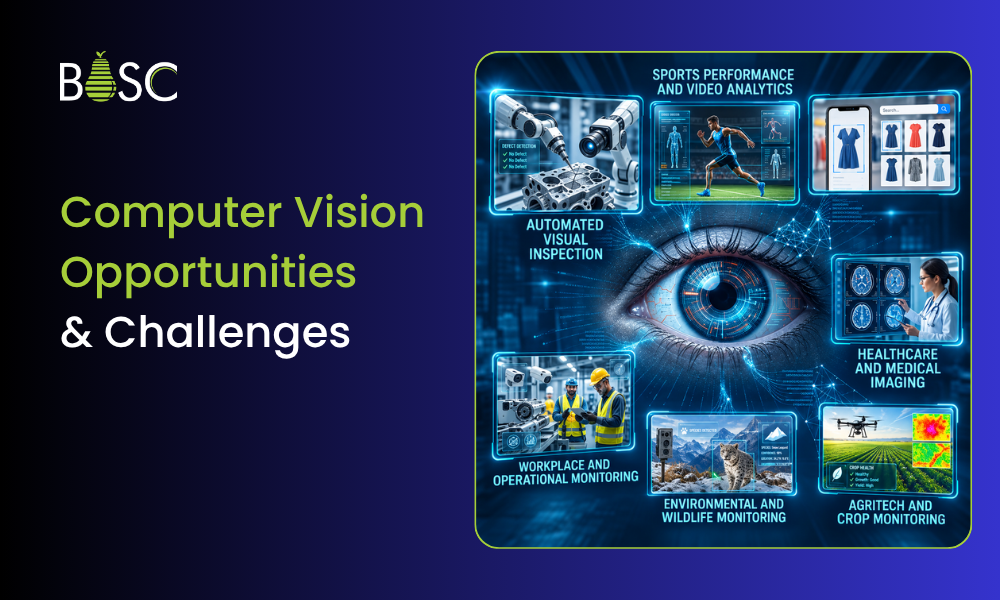
1. Automated Visual Inspection
Manufacturing and production environments generate large volumes of visual information. Computer vision can inspect products, components, packaging, labels, and assemblies to identify defects or inconsistencies. Businesses can use Automated Visual Inspection Systems for Manufacturing to automate inspection workflows and identify quality issues more consistently.
A visual inspection system can help detect:
- Surface defects
- Missing components
- Incorrect assembly
- Damaged products
- Packaging problems
- Incorrect labels
- Manufacturing inconsistencies
Instead of depending entirely on manual inspection, businesses can use automated systems to continuously evaluate products and flag exceptions.
However, effective visual inspection requires more than model accuracy. Camera placement, lighting, image quality, production speed, product variation, and pass/fail criteria all influence system performance.
2. Sports Performance and Video Analytics
Sports is another area where computer vision can turn video into measurable performance information.
Video analysis systems can track movement, identify important events, and generate insights that coaches and athletes can use during training and performance reviews. For organizations looking for AI Sports Video Analytics Software Development, computer vision provides the foundation for building these intelligent performance analysis systems.
Applications can include:
- Player movement tracking
- Technique analysis
- Pose estimation
- Ball tracking
- Performance measurement
- Video segmentation
- Training-session analysis
- Performance reporting
This reduces the amount of time coaches need to spend manually reviewing large amounts of video and makes it easier to identify patterns across sessions.
For organizations building sports technology products, computer vision can become the foundation for more intelligent performance analytics and coaching workflows. BOSC, for example, works on sports performance and video analytics systems that turn visual data into actionable insights.
3. Retail and Visual Search
Retailers can use computer vision to understand products and customer interactions through visual information.
Visual search allows users to search for products using images rather than relying entirely on text-based queries.
Computer vision can also support:
- Product identification
- Shelf monitoring
- Inventory visibility
- Checkout automation
- Customer behavior analysis
- Product recommendations
- Store analytics
The opportunity is particularly relevant for businesses that already generate large volumes of visual information but do not have an efficient way to analyze it.
4. Healthcare and Medical Imaging
Medical imaging generates highly complex visual data.
Computer vision can support healthcare professionals by analyzing images and identifying patterns that may require additional attention. Healthcare computer vision solutions can support applications ranging from medical image analysis to patient monitoring and diagnostic workflows.
Potential applications include:
- Medical image analysis
- Detection of abnormalities
- Image classification
- Patient monitoring
- Surgical assistance
- Diagnostic support
Computer vision should not be treated as a replacement for qualified medical professionals. Instead, properly designed systems can support clinical workflows by helping process and organize visual information.
Healthcare applications also require particularly strong attention to privacy, security, validation, and regulatory requirements.
5. Agriculture and Crop Monitoring
Agriculture can benefit from computer vision by making visual monitoring more scalable.
Images captured by cameras, drones, or other systems can be analyzed to identify crop conditions, detect abnormalities, and monitor fields.
Potential applications include:
- Crop health monitoring
- Disease detection
- Weed identification
- Fruit and crop counting
- Yield estimation
- Plant growth monitoring
- Precision agriculture
Instead of relying exclusively on manual field inspection, computer vision can help farmers and agricultural organizations identify areas that require attention.
6. Environmental and Wildlife Monitoring
Computer vision can also help organizations analyze visual information from natural environments.
Camera systems can monitor wildlife populations, track animal movement, identify environmental changes, and support conservation programs.
This creates an opportunity to collect and analyze large volumes of visual data without requiring constant manual observation.
The same principle can be applied to environmental monitoring, infrastructure inspection, and other situations where visual conditions need to be observed continuously.
7. Workplace and Operational Monitoring
Computer vision can provide businesses with greater visibility into physical workflows. For specialized use cases, Custom Vision Model Development Services for Specialist Visual Tasks can help build models tailored to specific visual requirements and operational environments.
For example, systems can identify events, monitor process stages, detect exceptions, and provide operational information to teams.
Possible applications include:
- Process monitoring
- Worker activity analysis
- Safety-event detection
- Workflow monitoring
- Equipment-state detection
- Queue monitoring
- Exception detection
The objective should not simply be to collect more video. The system should identify information that helps teams make faster and better operational decisions.
Key Challenges of Computer Vision
The opportunities are significant, but deploying computer vision in real environments introduces several technical and operational challenges.
1. Data Quality and Dataset Bias
Computer vision models depend heavily on the quality and representativeness of their training and evaluation data.
A model may perform well in a controlled environment but produce unreliable results when conditions change.
Common sources of variation include:
- Lighting
- Camera angle
- Backgrounds
- Object orientation
- Weather
- Image resolution
- Product variation
- Human movement
- Occlusion
If the dataset does not represent real operating conditions, the resulting system may perform poorly after deployment.
Businesses therefore need a deliberate approach to image collection, labeling, validation, and dataset management.
2. Lighting and Image Capture
A computer vision model cannot compensate for every problem created at the camera level.
Poor lighting, glare, shadows, motion blur, camera positioning, and inconsistent backgrounds can significantly affect results.
This is particularly important in industrial environments.
Before developing a model, organizations should understand:
- What needs to be captured?
- Where should cameras be positioned?
- What lighting conditions exist?
- How quickly do objects move?
- What image resolution is required?
- What environmental changes can occur?
The imaging system and AI model should be designed together.
3. High Computational Requirements
Advanced computer vision systems can require substantial processing resources, particularly when analyzing high-resolution images or real-time video.
Businesses may need to balance:
- Accuracy
- Processing speed
- Hardware requirements
- Cloud infrastructure
- Storage
- Energy consumption
- Operating costs
For some use cases, edge computing can reduce latency by processing visual data closer to where it is generated.
For others, cloud-based infrastructure may provide greater flexibility and scalability.
The appropriate architecture depends on the business workflow and performance requirements.
4. Privacy and Ethical Considerations
Computer vision can process sensitive visual information, particularly when people are involved.
Facial recognition, workplace monitoring, surveillance, and healthcare applications can create significant privacy considerations.
Organizations need to consider:
- What information is being collected?
- Why is it being collected?
- Who can access it?
- How long is it stored?
- Is personally identifiable information involved?
- What consent or governance requirements apply?
Privacy and security should be considered during system design rather than added after deployment.
5. Security and Adversarial Risks
Computer vision systems can also be exposed to security threats.
Manipulated images, altered inputs, compromised cameras, and other forms of adversarial activity can affect model performance or system reliability.
Security therefore needs to cover more than the AI model itself.
Businesses should consider the complete system, including:
- Cameras and devices
- Data pipelines
- APIs
- Storage
- Model endpoints
- Access controls
- Monitoring
- Deployment infrastructure
6. Integration With Existing Systems
A computer vision model rarely operates in isolation.
For a business application, its output may need to connect with existing software, databases, dashboards, production systems, or human workflows.
For example, a detected manufacturing defect may need to trigger an alert, stop a process, create a record, or notify an operator.
This means successful computer vision implementation requires integration engineering in addition to model development. BOSC’s current AI integration approach similarly focuses on embedding AI outputs into existing business systems rather than keeping them isolated in separate tools.
7. Scalability and Real-World Deployment
A computer vision system that works on a small test dataset may not automatically work across multiple locations, cameras, products, or environments.
Real-world deployment introduces variables that may not appear during a pilot.
Businesses need to plan for:
- Additional cameras
- Higher video volumes
- Multiple locations
- Hardware differences
- Model updates
- New product variations
- Performance monitoring
- System downtime
- Data storage
Scalability should therefore be part of the architecture from the beginning.
Emerging Applications of Computer Vision
Computer vision is expanding beyond traditional image recognition.
AI-Powered Visual Search
Visual search allows users to find products, objects, or information using images instead of text.
This can improve product discovery and create new ways for customers to interact with digital platforms.
Intelligent Manufacturing
Manufacturers can combine computer vision with automation systems to create more responsive production environments.
Vision systems can detect defects, monitor production processes, verify assembly, and identify exceptions in real time.
Real-Time Video Intelligence
Instead of reviewing video after an event occurs, businesses can use computer vision to analyze video streams as they happen.
This creates opportunities for:
- Real-time alerts
- Safety monitoring
- Operational monitoring
- Sports analytics
- Security applications
- Process optimization
Edge Computer Vision
Edge computing allows visual processing to happen closer to the camera or device.
This can be useful when applications require low latency, limited network connectivity, data privacy, or reduced dependence on cloud processing.
For production environments, edge deployment can be especially valuable when decisions need to happen immediately.
Multimodal AI
Computer vision is increasingly being combined with other AI capabilities.
Instead of analyzing an image alone, systems can combine visual information with text, audio, structured data, and business context.
This opens opportunities for more sophisticated AI applications that can understand visual information and connect it to broader workflows.
How Businesses Can Approach a Computer Vision Project
A successful computer vision project should begin with the business problem rather than the technology.
Step 1: Define the Business Objective
Start by identifying the decision or process that needs improvement.
For example:
- Reduce manual inspection
- Detect defects earlier
- Analyze sports performance
- Monitor operational activity
- Automate document or image processing
- Improve safety monitoring
Step 2: Evaluate the Visual Data
Determine whether the available images or video are sufficient for the intended use case.
Review camera conditions, image quality, volume, labeling requirements, and environmental variation.
Step 3: Define Success Criteria
Accuracy alone may not be enough.
Depending on the application, businesses may need to measure:
- False positives
- False negatives
- Processing latency
- Throughput
- Detection accuracy
- Human review requirements
- Cost per operation
Step 4: Select the Right Architecture
The solution may involve cloud infrastructure, edge computing, specialized hardware, or a combination of approaches.
The architecture should reflect the application’s latency, security, scalability, and operational requirements.
Step 5: Integrate With the Workflow
The output of the computer vision system should lead to a useful action.
That could mean updating a database, triggering an alert, creating a report, sending information to another system, or requesting human review.
Step 6: Test Under Real Conditions
Testing should include real-world variation rather than only ideal examples.
Lighting changes, camera movement, object variation, environmental conditions, edge cases, and system load should all be considered before wider deployment.
Step 7: Monitor After Deployment
Computer vision systems need ongoing monitoring.
Changes in products, environments, cameras, workflows, and data can affect performance over time.
Monitoring can help identify:
- Model performance changes
- Data drift
- Increasing false positives
- Missed detections
- Latency problems
- Infrastructure issues
A production computer vision system should therefore be treated as an ongoing engineering system rather than a one-time AI model.
Why Computer Vision Projects Fail
Many computer vision projects struggle not because the underlying technology is incapable, but because the implementation focuses too heavily on the model.
Common problems include:
- Starting with technology instead of the business problem
- Using insufficient or unrepresentative data
- Ignoring camera and lighting conditions
- Defining accuracy without operational metrics
- Building a prototype without a deployment plan
- Failing to integrate with existing systems
- Underestimating infrastructure and operating costs
- Not planning for monitoring and model maintenance
A successful implementation requires computer vision, data, software engineering, infrastructure, and business workflow considerations to work together.
Building Production-Ready Computer Vision Systems
Computer vision creates opportunities across industries, but the path from a promising prototype to a dependable production system requires careful engineering.
The strongest applications are those where visual intelligence is connected directly to a measurable business outcome.
BOSC Tech Labs builds computer vision systems around the complete workflow from use-case definition and image-data requirements to model development, integration, deployment, and ongoing monitoring.
Our computer vision work can support applications such as sports performance analytics, automated visual inspection, operational monitoring, and other systems where visual data needs to become actionable intelligence.
If you are evaluating a computer vision use case, the first step is not necessarily building a model. It is understanding what needs to be seen, what decision needs to follow, and how that decision fits into your existing workflow.
Conclusion
Computer vision has moved beyond basic image recognition. Businesses can now use visual intelligence to automate inspections, analyze sports performance, monitor operations, improve retail experiences, support healthcare workflows, and process visual information at scale.
At the same time, successful deployment requires attention to data quality, privacy, security, infrastructure, integration, scalability, and ongoing performance.
The opportunity is not simply to make machines “see.” It is to turn visual information into reliable, actionable business intelligence.
BOSC Tech Labs helps businesses design and build production-focused computer vision systems that connect visual data with real operational workflows.
If you’re exploring how computer vision could be applied to your specific business process, you can connect with BOSC Tech Labs to discuss your use case and technical requirements.