

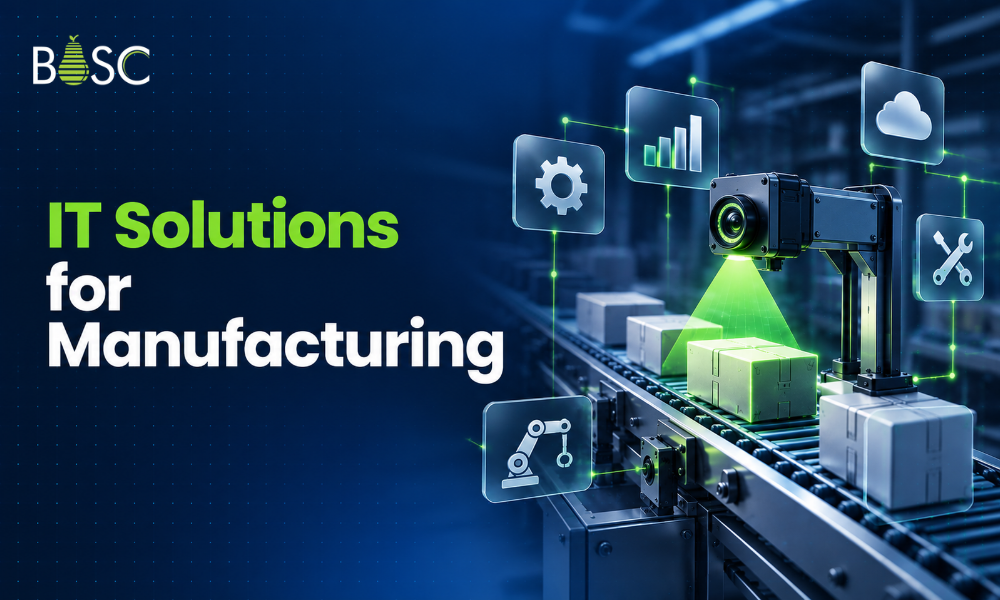
IT solutions for manufacturing are software, data, cloud and AI systems that help a plant make more good parts with less downtime, scrap and manual work.
At BOSC Tech Labs, our engineers build AI, cloud, data and computer vision systems, so we see where factory software projects succeed and where they stall after go-live. This guide shares what we check first.
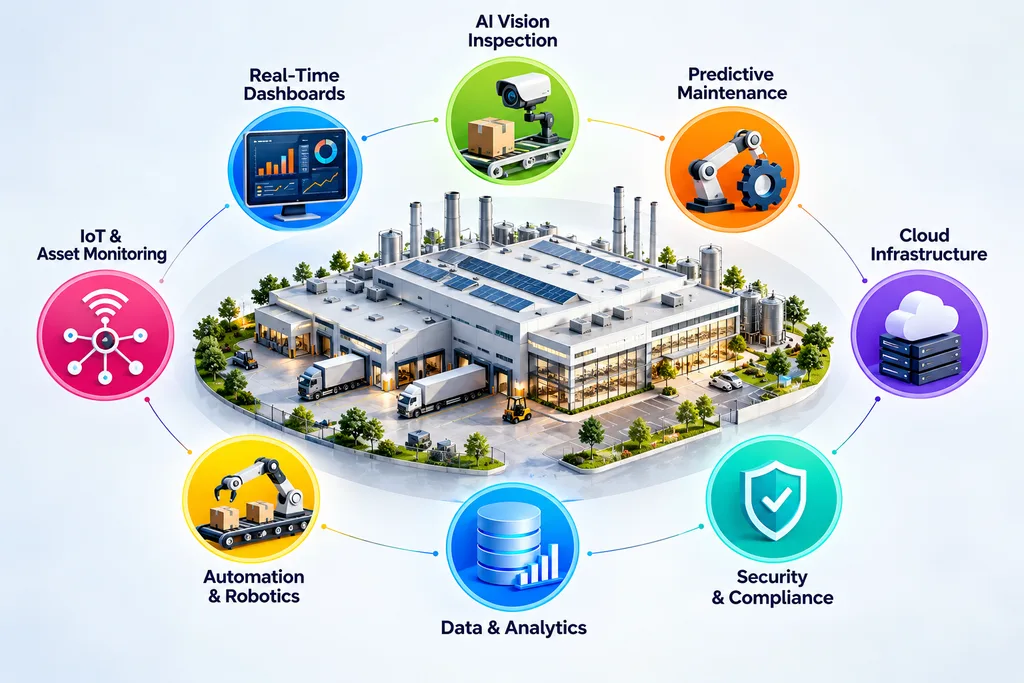
This guide is for owners, plant managers, operations leaders and IT managers at manufacturers with 20–500 employees. It explains eight systems, their business value, what to measure and how to introduce them without stopping production.
Key takeaways:
- Start with the problem that costs most: defects, downtime or missing data, not with a technology.
- manufacturing IT solutions are project-based systems; managed IT services provide ongoing support. Many plants need both.
- IBM X-Force reported manufacturing accounted for 27.7% of incidents in 2025, remaining the most attacked industry for the fifth consecutive year.
- Pilot on one production line before expanding across the plant.
What Are IT Solutions for Manufacturing?
IT solutions for manufacturing are systems built or configured for a plant’s data, machines and people, including inspection cameras, production dashboards and maintenance alerts that address measurable operating problems.
These systems can connect three layers: business applications such as enterprise resource planning (ERP), production software such as a MES (manufacturing execution system), and the machines and sensors generating operational data.
The goal is to reduce scrap, prevent unplanned downtime, speed up reporting and replace repetitive manual checks with reliable information.
Consider a stamping line where operators record scratches on paper and enter totals at the end of each shift. Managers might discover a quality problem a day after it starts.
A camera-based inspection system can flag defects as parts pass the inspection point. Connecting its results to production data can help managers identify when and where defects occur.
Off-the-shelf software rarely solves every plant problem by itself. Machines may use different protocols, legacy systems may lack APIs, and production teams may define the same metric differently.
The right approach is to map existing systems first, then identify the smallest integration or application change that produces a measurable improvement.
Manufacturing IT Solutions vs Manufacturing IT Services: What Is the Difference?
Manufacturing IT solutions are systems developed or configured to solve a defined problem, while manufacturing IT services provide ongoing support for networks, devices, applications and users.
The difference affects how you budget, select a provider and measure success.
| Point | IT solutions | IT services |
|---|---|---|
| What you get | A system, such as vision inspection, dashboards or a data platform | Ongoing support for help desk, devices and networks |
| How you pay | Project fee, followed by running costs | Monthly fee |
| Timeline | Build over weeks or months, then operate | Continuous |
| Success measure | Fewer defects, less downtime, faster reporting | Uptime and response times |
| Typical provider | Software and data engineering company | Managed IT provider |
Most IT solutions for manufacturing industry projects can lose value after go-live if nobody owns ongoing maintenance, monitoring and change management.
That ongoing support is often purchased as manufacturing managed services, with responsibilities defined in a monthly agreement.
The IT services manufacturing plants rely on daily, including ERP access, email and Wi-Fi, also help employees use new production systems consistently.
The practical takeaway is to define both the project scope and the operating responsibilities before approving a technology investment.
8 IT Solutions for Manufacturing That Deliver Measurable Results
The eight IT solutions for manufacturing below address common factory problems, from missed defects and fragmented production data to cybersecurity risks and slow access to technical knowledge.
Start by comparing the problem each system fixes, its success metrics and the smallest useful pilot.
| Solution | Main problem it fixes | What to measure | Typical first step |
|---|---|---|---|
| Computer vision inspection | Defects reaching customers | Defect escape rate, false rejects | Collect images of good and bad parts |
| Data integration | Numbers scattered across systems | Hours spent on manual reports | Map data sources |
| Production dashboards | Late visibility into operations | Time to spot a problem | Define five KPIs |
| Predictive maintenance | Unplanned machine stops | Downtime hours | Instrument one critical machine |
| Cloud architecture and cost control | Rising data and compute costs | Monthly cloud spend | Set budgets and alerts |
| Legacy modernization | Old tools blocking data flow | Manual workarounds | Decide whether to patch, wrap or replace |
| Security and compliance | Attacks and audit gaps | Audit findings | Segment the plant network |
| AI assistants | Slow answers for new staff | Time to answer, training time | Clean up SOPs and manuals |
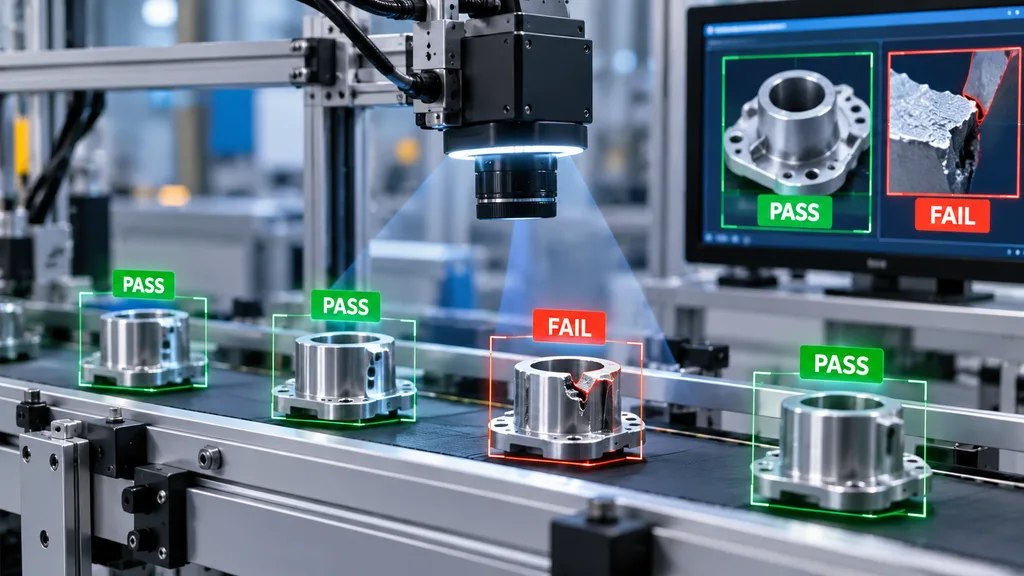
1. Computer vision for quality inspection
Computer vision uses cameras and trained AI models to identify visible defects, such as scratches, dents, missing components and incorrect labels, as products move along a line.
For example, a stamping plant can use image-based checks to flag surface defects before parts reach packaging. Results can also help teams trace recurring quality issues.
When we scope a visual inspection system, the first question is not the camera but the defect: how it looks, how often it occurs and who decides pass or fail today. That sets the accuracy target.
Measure defect escape rate, false rejects and inspection time. Begin with one product and a representative collection of good and defective samples.
Explore our visual quality and inspection systems Visual Quality & Inspection Systems to assess potential applications.
2. Data integration across ERP, MES and machines
Data integration connects ERP, MES, machine logs and spreadsheets into a trusted dataset. It reduces repeated data entry and gives teams a consistent view of production.
A plant compiling overall equipment effectiveness (OEE) in Excel every Monday could combine production counts, downtime events and quality records into one reporting pipeline.
Our data engineers usually start by mapping where production numbers live today: ERP exports, machine logs and spreadsheets. Most dashboard projects stall on that mapping, not on the charts.
Measure hours spent preparing reports and the frequency of data errors. Start by mapping the source, owner, format and update frequency of each critical metric.
Our data integration services can help connect fragmented production information.
3. Real-time production dashboards
Production dashboards display output, scrap, downtime and OEE by line or shift, helping managers see problems while corrective action is still possible.
OEE combines availability, performance and quality. Its value depends on consistent definitions and reliable data, not just an attractive dashboard.
Dashboards are often the first of the manufacturing IT solutions that managers use every day.
Measure how quickly supervisors identify a problem and whether shift reports require fewer manual corrections. Begin with five agreed KPIs for one production line.
4. AI-based predictive maintenance
Predictive maintenance analyzes signals such as vibration, temperature and electrical current to identify patterns that may indicate an approaching machine failure.
For example, a compressor that repeatedly fails without warning may benefit from condition monitoring. However, a useful prediction depends on relevant sensor readings and credible maintenance records.
Measure unplanned downtime hours, maintenance costs and unnecessary maintenance interventions. Start with one critical machine and confirm that its sensor data is reliable.
5. Cloud architecture and cost control
Cloud architecture provides scalable storage and computing for production history, reporting and AI workloads without requiring every analytical task to run on local hardware.
A manufacturer can retain machine control on-site while sending selected historical data to the cloud for reporting. Access controls and cost limits should be designed from the beginning.
When we review cloud bills for data-heavy workloads, idle compute and forgotten storage are the usual culprits. We set budgets and alerts before scaling up, so the invoice holds no surprises.
Measure monthly cloud spend, storage growth and workload utilization. Start with a review of existing services, retention policies and unused resources.
Our cloud cost optimization services can help establish budgets and monitoring.
6. Legacy system modernization
Legacy modernization updates old applications or connects them to newer systems through APIs and controlled data exchanges. It can improve access to production information without replacing every existing tool.
A plant may still depend on an older scheduling application that works reliably but cannot share data with its reporting platform.
Choose between patching the application, wrapping it with an integration layer or replacing it. Measure manual workarounds, support effort and data availability before committing.
Our legacy product modernization approach can help assess these options.
7. Security, compliance and OT security
OT security protects operational technology: the systems that monitor or control industrial equipment, where a cyber incident can affect production and physical safety.
Controls include network segmentation, restricted access, tested backups and monitoring. A ransomware incident can disrupt both business applications and production if the environments are poorly separated.
Measure audit findings, backup restoration results and the time needed to identify suspicious activity. Start by mapping connections between office networks and production equipment.
8. AI assistants for plant teams
AI assistants can retrieve answers from standard operating procedures (SOPs), equipment manuals and maintenance logs, helping operators find approved information faster.
Retrieval-augmented generation (RAG) connects a language model to selected documents. Answers still need suitable access controls, source references and a way to flag missing or outdated information.
Measure time to answer common questions and time needed to train new operators. Start with a limited set of maintained documents and test answers against known questions.
An assistant cannot compensate for missing instructions or inaccurate manuals. Assign document owners and a review process before expanding its scope.
Choose the system that targets your most expensive operational problem, then prove its value with a controlled pilot before investing in a broader rollout.
What Is the Difference Between IT and OT in Manufacturing?
Information technology (IT) runs business systems such as email and ERP, while operational technology (OT) monitors and controls machines through systems such as PLC, SCADA and HMI.
IT commonly prioritizes data confidentiality and access. OT prioritizes availability and safety, so a routine software update can have very different consequences on a production line.
| Point | IT | OT |
|---|---|---|
| Main job | Run the business | Run the machines |
| Typical systems | ERP, email, CRM | PLC, SCADA, HMI, MES |
| Top priority | Data confidentiality | Uptime and safety |
| Updates | Often monthly | Usually during approved maintenance windows |
| Usual owner | IT team or provider | Engineering or maintenance |
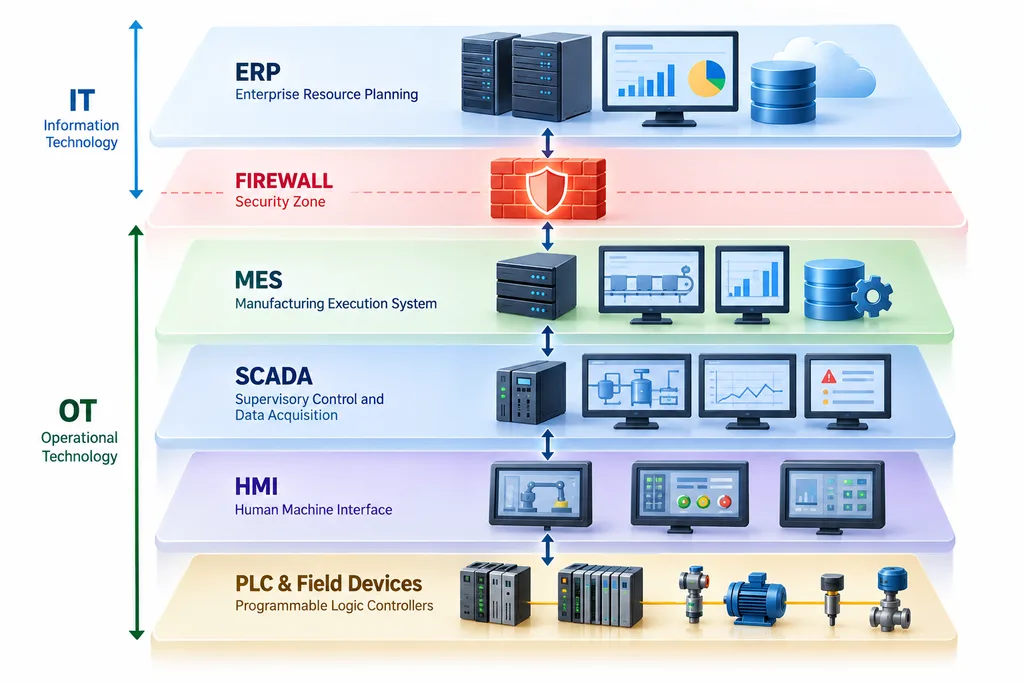
New connections are where OT security gaps can appear. Cameras and sensors may sit on the plant side, while analytics dashboards and cloud services operate on the IT side.
manufacturing IT support staff should know which plant devices they must never patch without engineering approval. Define these boundaries before connecting a machine to a new platform.
Good IT solutions for manufacturing respect this boundary from the design stage. The IBM X-Force Threat Intelligence Index 2026 reported that manufacturing accounted for 27.7% of incidents in 2025, the fifth consecutive year it was the most attacked industry.
For industrial security planning, consult the [NIST SP 800-82 Guide to Operational Technology Security] and relevant ISA/IEC guidance.
How to Roll Out IT Solutions for Manufacturing Without Stopping Production
A safe rollout starts with one production line and one measurable problem, then compares a limited pilot against a recorded baseline before expanding to other lines.
Our team prefers a pilot on one line or one product before any plant-wide rollout. A pilot shows real accuracy and adoption within weeks, and it limits risk if the approach needs to change.
Use these six steps to structure the project:
- Pick the costliest problem, using scrap, downtime or reporting effort as evidence.
- Record a baseline so you can compare results before and after the pilot.
- Map the data sources, machine interfaces, dependencies and system owners.
- Build the pilot on one line, with a clear test plan and rollback option.
- Train operators and agree who monitors and supports the system after launch.
- Scale line by line during planned downtime, using lessons from each phase.
A typical pilot plan separates scoping, building, measurement and rollout. Actual durations depend on system complexity, data readiness and production access.
| Phase | Typical length | What happens | Who is involved |
|---|---|---|---|
| Scope | 1–2 weeks [verify] | Define problem, baseline and data map | Plant manager, engineering, partner |
| Build | 3–8 weeks [verify] | Pilot on one line | Partner, line lead |
| Measure | 2–4 weeks [verify] | Compare results with baseline | Plant manager |
| Scale | Line by line | Roll out during planned downtime | All teams |
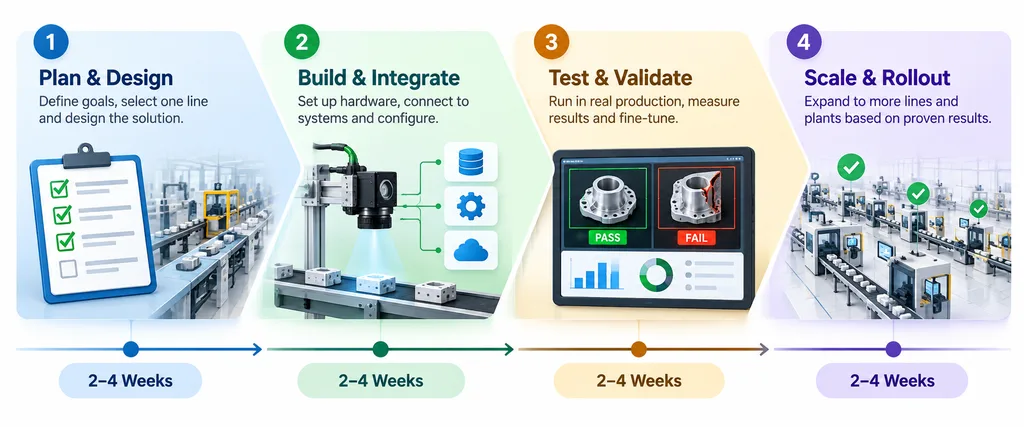
Rolled out this way, IT solutions for manufacturing can demonstrate value on one line before you fund the next. Agree on success criteria and rollback conditions before work begins.
Do You Also Need Managed IT Services for Manufacturing?
Usually, yes. New production systems still depend on everyday IT, including networks, devices, backups and user access, which many plants arrange through a separate managed IT provider.
managed IT services for manufacturing typically cover recurring operational support rather than building a new production application or AI model.
What managed IT support covers
Common services in an ongoing support agreement include:
- Help desk and user account support.
- Network, Wi-Fi and connectivity management.
- Device management and routine software maintenance.
- Backup monitoring and recovery coordination.
- Security monitoring and incident escalation.
- Microsoft 365 administration.
Typical IT services for manufacturing companies bundle these activities into a recurring fee, although scope varies between providers.
Many managed services for the manufacturing industry are priced per user or device. Verify current pricing, exclusions and additional charges before comparing proposals.
How to choose IT support for manufacturers
Evaluate the provider’s ability to support your operating hours and coordinate with production engineering.
- Plant experience: ask how the provider handles production-critical systems.
- Shift coverage: confirm response times during nights, weekends and holidays.
- OT boundaries: establish who approves changes to industrial equipment and networks.
- Clear exclusions: document which devices, applications and sites are covered.
A provider offering IT support for manufacturers should explain its escalation process for incidents that threaten production. Confirm whether response commitments differ by severity or time of day.
Ask whether its IT support for manufacturing industry scope includes industrial systems or only conventional business IT. Do not assume PLCs, SCADA or production equipment are covered.
BOSC Tech Labs builds and monitors software, data and cloud systems. Desk-side support, office device management and help desk services generally remain with your internal IT team or a separate provider.
IT solutions for manufacturing projects work best when these responsibilities are agreed upon before launch. Assign named owners for application monitoring, infrastructure, security incidents and production approvals.
How to Choose a Partner for Manufacturing Technology Projects: 8 Questions
Choose a manufacturing technology partner that starts with an operational problem, demonstrates relevant capabilities, tests its approach in a pilot and defines ownership after deployment.
Use these eight questions during vendor discussions:
- What problem would you solve first, and how will we measure it? A good answer identifies a baseline and a measurable outcome.
- What similar systems have you built, and can we see a demo? Look for a working demonstration relevant to your production environment.
- How will the system connect to our ERP, MES and machines? Expect a clear integration plan that identifies dependencies.
- How do you protect the plant network during and after the project? The answer should cover access controls, segmentation and change approval.
- What does the pilot cost and how long does it take? Request defined deliverables, assumptions and exclusions.
- Who owns the code, models and data at the end? Confirm ownership, access rights and handover terms in writing.
- Who supports the system after go-live, and how? Require named responsibilities for monitoring, fixes and escalation.
- What are the running costs, including cloud? Include hosting, storage, monitoring, licensing and maintenance.
Unlike general IT services for manufacturers, a project partner should demonstrate a working pilot, not just promise ongoing support.
If you already pay for IT managed services for manufacturing firms, ask both providers to agree on handover rules and incident ownership.
Question seven matters most when your manufacturing managed services provider will run the system day to day. Good IT support for manufacturers and a software project partner should work as one team.
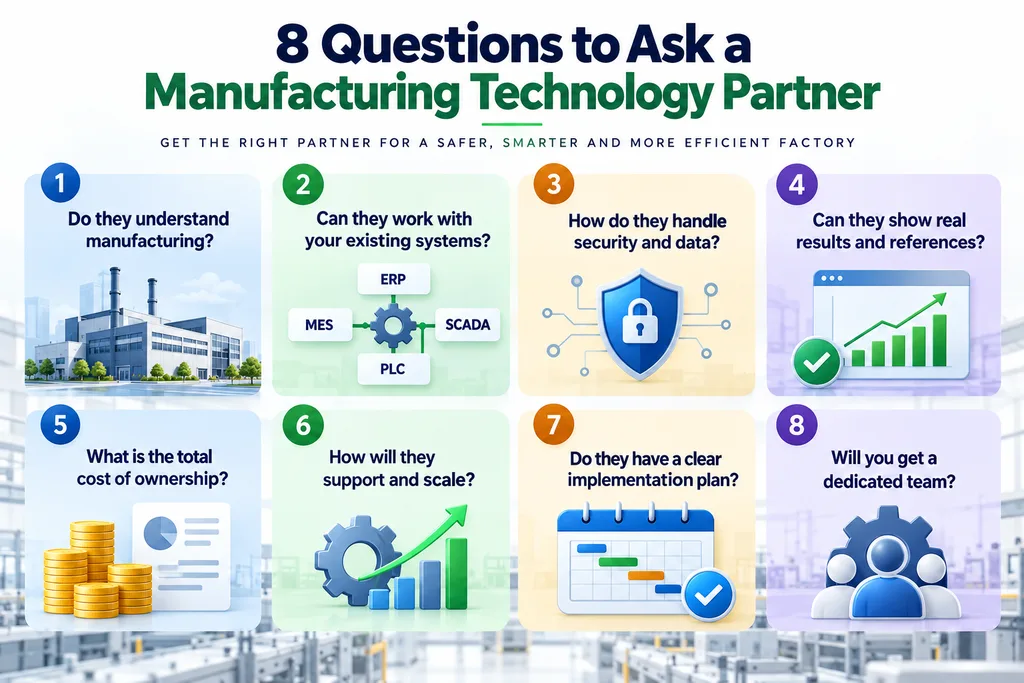
The best IT solutions for manufacturing partner is the one that can explain what it will change, how you will measure the result and what happens when something goes wrong.
Frequently Asked Questions
How do I compare IT services for manufacturers?
Compare scope and exclusions, response times for each shift, OT device handling and the full monthly price, including add-ons. Confirm who owns production incidents and application changes.
How long does a computer vision or AI pilot take in a factory?
Most IT solutions for manufacturing pilots depend on data quality, defect examples, system integration and production access. Agree on a test period and success criteria before development begins.
Can new systems work with legacy machines and old PLCs?
Yes, many systems can connect through gateways, edge devices or existing data exports without replacing the machine. Check interface compatibility and obtain engineering approval before connecting equipment.
Do manufacturers need 24/7 IT support?
Plants operating nights or weekends may need round-the-clock coverage for critical systems. IT support for manufacturing industry should define response times, escalation paths and which production systems are covered.
Which standards matter for plant data and cloud systems?
Consider the NIST Cybersecurity Framework, ISO 27001 for information security management and IEC 62443 for industrial control systems. Customer requirements and risk assessments determine which controls apply.
Is cloud or on-premise better for factory data?
A hybrid architecture often works well: keep time-critical machine control on-site while using cloud services for historical analysis and AI training. Security, latency, connectivity and cost should guide the final design.
Next Step: Pick One Line and One Problem
Start with the operational problem that costs your plant the most. Select one system, establish a baseline and run a pilot before committing to a wider rollout.
Keep your manufacturing IT services provider involved from day one. Clear responsibilities across engineering, IT and software teams help prevent support gaps after launch.
BOSC Tech Labs can help assess the software, data, cloud and AI requirements through our AI consulting. Explore which IT services for manufacturing fit your plant’s priorities, data readiness and budget.
Start with one production line and one measurable result. book a free consultation to discuss the first project with BOSC Tech Labs.