

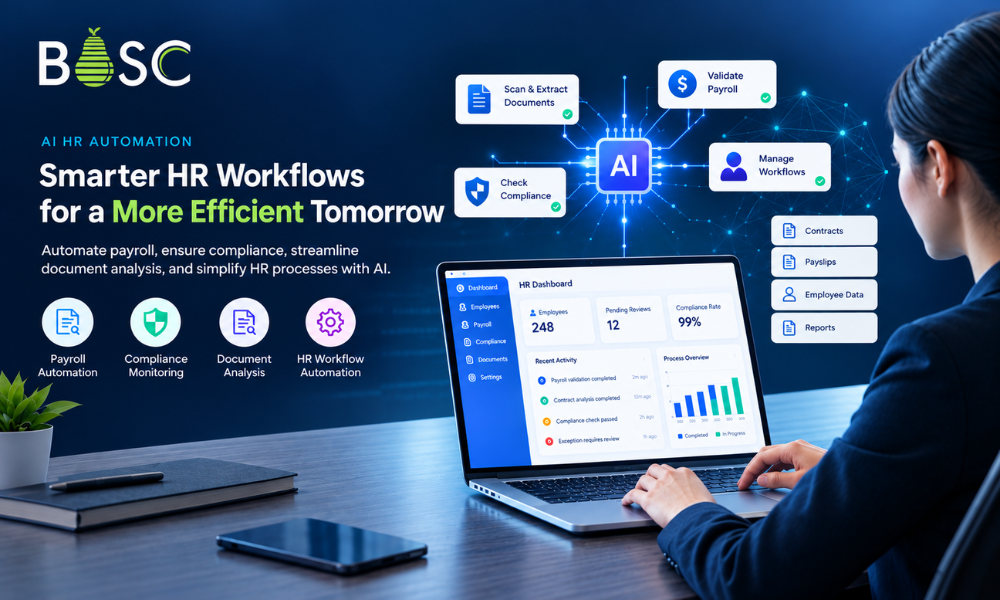
AI HR automation uses artificial intelligence, workflow automation, document processing, and system integrations to reduce repetitive HR work and improve how businesses manage employee data, payroll, compliance, and internal processes.
Unlike traditional HR automation, which mainly follows predefined rules, AI-powered HR systems can also analyze documents, extract information, compare records, identify exceptions, and assist employees with decisions that require contextual information.
For example, an AI HR automation system can compare employment contracts with payroll records, identify potential discrepancies, route exceptions to HR teams, and maintain an auditable workflow for review.
The most effective implementations do not attempt to automate every HR decision. They combine AI with business rules, existing HR systems, security controls, and human oversight.
This article explains how AI HR automation works, which HR processes can benefit from it, and how businesses can build production-ready AI systems for payroll, compliance, and workforce workflows.
What Is AI HR Automation?
AI HR automation combines artificial intelligence, document processing, workflow automation, and system integration to reduce repetitive HR work.
Traditional HR automation generally follows predefined rules. For example, a workflow may automatically send an onboarding email when a new employee is added to an HR system.
AI-powered automation can handle more variable inputs.
It can:
- Extract information from contracts and documents
- Understand unstructured text
- Compare information across multiple sources
- Classify documents and requests
- Identify inconsistencies or potential compliance issues
- Summarize relevant information
- Route exceptions to the appropriate reviewer
- Maintain structured records for audit and reporting
- Trigger actions across connected business systems
The important distinction is that AI should not simply replace an existing manual step. A production-ready system should understand the workflow around that step.
For example, checking whether an employee’s pay matches their contract involves more than extracting numbers. The system may need to interpret contract clauses, account for different pay structures, compare information against payroll records, flag exceptions, and provide a review path.
That is where AI HR automation becomes an engineering problem rather than simply an AI feature.
Why HR Teams Are Moving Toward AI Automation
Many HR processes still depend on spreadsheets, emails, documents, and manual verification.
This becomes increasingly difficult when organizations have:
- Large and distributed workforces
- Multiple employment contracts
- Different compensation structures
- Complex regulatory requirements
- Multiple HR and payroll systems
- High volumes of employee documents
- Frequent policy or regulatory changes
Manual processes also create an operational problem: important information may exist in different systems without a reliable way to connect it.
A payroll team may have payslip data in one system, employment contracts stored as documents, employee information in an HR platform, and compliance reviews tracked through spreadsheets.
The challenge is not necessarily the lack of data. It is the lack of a reliable workflow connecting that data.
AI can help bridge this gap when it is combined with appropriate data pipelines, business rules, workflow logic, access controls, and human review.
7 HR Processes Where AI Automation Can Create Value
1. Contract and Document Analysis
HR departments regularly work with employment contracts, policies, applications, forms, and other documents.
AI-powered document processing can extract structured information from these documents and make it available to downstream workflows.
For example, a system can identify:
- Employee details
- Job roles
- Compensation information
- Contract terms
- Relevant clauses
- Dates and conditions
- Role-specific requirements
This reduces the need for employees to manually search through documents every time information is required.
For organizations dealing with thousands of documents, the difference can be significant.
2. Payroll Validation
Payroll accuracy is one of the areas where automation can have a direct operational impact.
An AI-powered payroll validation workflow can compare information from employment contracts with payroll records and identify potential inconsistencies.
A typical process could look like this:
Contract → Data Extraction → Payroll Data → Comparison → Validation → Exception → Human Review
Instead of manually comparing records, the system performs the initial analysis and sends questionable cases to the appropriate reviewer.
This does not eliminate human oversight. It moves human attention toward the records that actually require investigation.
3. Wage Compliance Monitoring
Wage compliance can become difficult when organizations operate across different roles, employment conditions, awards, or regulatory environments.
A centralized AI workflow can help standardize the validation process.
The system can analyze relevant contract and payroll information, identify potential compliance gaps, and maintain records of review outcomes.
In BOSC Tech Labs’ HR automation project, the platform was designed specifically to compare employment contracts and payslips, identify underpayment or overpayment risks, and integrate compliance validation into existing HR and payroll workflows.
4. Exception Management
Not every HR transaction should be automatically approved.
Some records will contain unusual conditions, incomplete information, or potential compliance issues.
A good automation system therefore needs an exception-management layer.
Instead of allowing an unusual record to stop the entire process, the system can:
- Identify the exception.
- Record the reason.
- Assign it to the appropriate reviewer.
- Preserve the relevant supporting information.
- Track the review.
- Record the final resolution.
This creates a more controlled workflow than simply relying on an AI-generated answer.
5. Employee Data Processing
HR teams handle large quantities of sensitive information.
AI can assist with classification, extraction, validation, and routing of employee data, but automation must be designed around appropriate access controls.
Role-based permissions can ensure that employees only access information relevant to their responsibilities.
For AI HR applications, security is therefore part of the application architecture rather than something added after development.
6. HR Knowledge and Policy Assistance
HR teams frequently need to search internal policies, employment documents, benefits information, and organizational guidelines.
An AI knowledge assistant can retrieve relevant information from approved internal sources and provide contextual answers.
For sensitive HR use cases, the system should also consider:
- Role-based access
- Source traceability
- Data permissions
- Response evaluation
- Human escalation
- Auditability
This makes the difference between a generic chatbot and an enterprise-ready internal HR assistant.
7. HR Workflow Coordination
HR processes often involve several systems and people.
For example:
Employee Request → HR System → Document → Approval → Payroll → Notification → Record
AI workflow automation can coordinate these steps while allowing predefined business rules and human approvals to remain in control.
This approach is particularly useful when the objective is not to automate one isolated task, but to reduce manual handoffs across an entire process.
A Real-World Example: Building an AI HR Automation Platform
A practical example comes from a BOSC Tech Labs project involving wage compliance and payroll validation.
The client needed to compare employment contracts with payslips while handling different awards, clauses, role-specific pay structures, and diverse datasets. The system also needed to work with existing HR and payroll processes without disrupting them.
The resulting platform combined several capabilities:
AI-Based Contract and Payslip Analysis
The system processes employment contracts, awards, and payslips to extract and structure relevant information.
This creates a common data layer that can be used for comparison and validation.
Automated Compliance Validation
Contracts and payroll records move through structured validation and review workflows.
Potential discrepancies can be identified and routed for further investigation rather than requiring every record to be manually checked.
Structured Data Management
Centralized data models and processing pipelines allow information from different sources to be handled consistently.
This is important because AI performance depends heavily on the quality, structure, and accessibility of the underlying data.
Secure Access and Governance
Because employee and payroll information is sensitive, the platform incorporates role-based access controls and governance mechanisms.
Exception Tracking
HR and compliance teams can review flagged records, track discrepancies, and document resolution outcomes in one workflow.
Integration With Existing Systems
The platform was designed to integrate with existing HR and payroll systems rather than forcing organizations to replace their existing infrastructure.
The reported project results included more than 10,000 payslips processed, 2,000+ contracts analyzed, 70+ organizations supported, and a 90% reduction in manual compliance effort.
Read the full HR automation case study to see how the platform was designed and implemented.
What Makes AI HR Automation Different From Traditional HR Software?
Traditional HR software generally provides structured functionality around defined processes.
AI HR automation adds another layer: the ability to interpret variable information and support workflows involving documents, language, patterns, and exceptions.
For example:
| Traditional Automation | AI HR Automation |
| Fixed rules | Rules combined with AI-driven interpretation |
| Structured inputs | Structured and unstructured inputs |
| Predefined workflows | Context-aware workflow steps |
| Manual document review | AI-assisted document analysis |
| Fixed validation logic | AI-assisted comparison and classification |
| Exceptions often require manual handling | Exceptions can be classified and routed |
| Usually application-specific | Can connect multiple systems |
This does not mean AI should replace conventional automation.
In many production systems, the strongest architecture combines both.
Rules handle deterministic requirements. AI handles variable information. Workflow logic controls the process. Humans handle sensitive or ambiguous decisions.
The Technology Architecture Behind AI HR Automation
Building a reliable AI HR system requires more than connecting an application to an AI model.
A typical architecture may include several layers.
1. Data Sources
These can include:
- HR systems
- Payroll platforms
- Employment contracts
- Documents
- Internal databases
- Policy repositories
- Third-party systems
2. Data Processing
The system extracts, cleans, structures, and validates information before it reaches the AI or workflow layer.
3. AI Layer
Depending on the use case, this can include:
- Document intelligence
- Natural language processing
- Large language models
- Classification
- Information extraction
- Semantic search
- Anomaly detection
4. Business Logic
Business rules determine what should happen after AI produces an output.
For example:
Potential compliance issue detected → create exception → assign reviewer → request verification → record decision
5. Integration Layer
APIs and connectors allow the system to exchange information with HR, payroll, ERP, CRM, document-management, and other platforms.
6. Security and Governance
Access controls, permissions, logging, and data governance protect sensitive workforce information.
7. Monitoring and Evaluation
Production AI systems need monitoring to identify changes in quality, latency, errors, usage, and operating costs.
This system-level approach is consistent with how BOSC approaches AI software development, where AI capabilities are engineered as part of production software rather than treated as isolated features.
AI HR Automation Should Keep Humans in the Loop
One of the biggest mistakes in HR automation is assuming that every decision should be fully automated.
HR involves sensitive employee information and, in many cases, decisions with legal or financial consequences.
A better approach is to divide processes into three categories.
Fully Automated
Use automation when the task is predictable and low-risk.
Examples include:
- Document classification
- Data extraction
- Record synchronization
- Routine notifications
AI-Assisted
Use AI to support employees while keeping human responsibility.
Examples include:
- Contract analysis
- Policy search
- Payroll discrepancy identification
- Compliance review
Human-Controlled
Keep final decisions with authorized employees when the decision is sensitive, ambiguous, or requires organizational judgment.
Examples include:
- Employment decisions
- Disputed payroll cases
- Complex compliance exceptions
- Policy exceptions
The objective is not maximum automation.
The objective is controlled automation that improves throughput without removing necessary oversight.
How to Build an AI HR Automation System
A successful implementation should start with the workflow rather than the technology.
Step 1: Map the Existing HR Workflow
Document how information currently moves between employees, HR teams, payroll systems, documents, and approval processes.
Identify where work is delayed, duplicated, or manually verified.
Step 2: Identify the Best Automation Opportunity
Not every HR process needs AI.
Look for workflows with:
- High transaction volume
- Repetitive manual work
- Large document sets
- Frequent data comparison
- Clear success criteria
- Significant operational friction
Step 3: Assess Data Readiness
Determine where the required information lives and whether it can be accessed reliably.
Poorly structured or disconnected data can become the limiting factor in an AI project.
Step 4: Define Business Rules and Human Review
Decide what the system can automate, what requires AI assistance, and where human approval is mandatory.
Step 5: Design the System Architecture
Define the AI components, databases, APIs, workflow engine, security model, user interface, and monitoring layer.
Step 6: Build and Test With Real-World Cases
Testing should include normal cases as well as incomplete documents, unusual contracts, inconsistent data, and other edge cases.
Step 7: Integrate With Existing HR Systems
Avoid creating another isolated application if the objective is to improve the existing workflow.
Integration allows automation to become part of daily operations.
Step 8: Monitor After Deployment
AI systems need ongoing evaluation.
Monitor:
- Accuracy
- Exception rates
- Processing time
- User adoption
- Failure cases
- AI usage and cost
- Workflow completion rates
This creates a feedback loop for continuous improvement.
AI Workflow Automation for HR: What SMBs Should Consider
For small and mid-sized businesses, AI automation does not need to begin with a large transformation project.
A focused workflow can often provide a more practical starting point.
For example, an SMB could begin with:
Document intake → AI extraction → Validation → Approval → System update
Once the workflow is stable, additional processes can be added.
BOSC’s approach to AI workflow automation for SMBs focuses on identifying specific workflows where AI can reduce manual work while preserving appropriate human control.
This is particularly relevant for HR because many processes involve a combination of structured data, documents, approvals, and human decisions.
When Should You Build a Custom AI HR Application?
Off-the-shelf HR software can be sufficient when your processes closely match the capabilities of the platform.
Custom AI development becomes more relevant when you need:
- Industry-specific compliance workflows
- Custom document analysis
- Complex payroll validation
- Integration with legacy HR systems
- Organization-specific business rules
- Custom approval and exception workflows
- Advanced data processing
- AI capabilities embedded into an existing product
A custom system also gives the organization greater control over its workflow, integrations, security model, and future development.
BOSC’s AI app development services are designed around production workflows, system integrations, data foundations, evaluation, testing, and operational reliability.
Common Mistakes When Implementing AI in HR
Treating AI as a Standalone Feature
Adding an AI model without redesigning the surrounding workflow often creates another disconnected tool.
Ignoring Data Quality
AI cannot reliably interpret information that is incomplete, inconsistent, or inaccessible.
Automating Without Exception Handling
Real-world HR processes contain unusual cases. The system needs a clear way to flag and route them.
Removing Human Oversight
Some HR decisions should remain subject to review and approval.
Building Without Integration
An AI application that requires employees to repeatedly copy information between systems can simply move the manual work somewhere else.
Focusing Only on the AI Model
Model selection matters, but architecture, data, security, workflow logic, integration, monitoring, and user experience are equally important for production systems.
What Does the Future of AI HR Automation Look Like?
The next generation of HR systems is likely to become increasingly workflow-oriented.
Instead of separate tools for document processing, payroll validation, employee questions, compliance checks, and reporting, organizations can connect these capabilities through shared data and workflow infrastructure.
An HR automation system could eventually move through a process such as:
Understand → Extract → Validate → Decide → Route → Review → Record → Learn
The important part is not making every step autonomous.
It is creating a system where AI handles appropriate tasks, business rules provide consistency, and people retain control over decisions that require judgment.
Key Takeaways
- AI HR automation combines artificial intelligence, workflow automation, document processing, and system integrations.
- AI can assist with contract analysis, payroll validation, compliance monitoring, document processing, and HR workflows.
- The strongest systems combine AI with business rules and human review.
- HR automation should integrate with existing systems rather than create another disconnected workflow.
- Data quality, security, access control, and monitoring are critical for production HR applications.
- SMBs can start with one high-value workflow and expand automation as the system proves its value.
- Custom AI development becomes useful when existing HR platforms cannot support the required workflow, integrations, or AI capabilities.
Frequently Asked Questions About AI HR Automation
What is AI HR automation?
AI HR automation uses artificial intelligence, document processing, workflow automation, and system integrations to automate or assist with repetitive HR processes such as document analysis, payroll validation, compliance checks, employee data processing, and workflow coordination.
How can AI automate payroll?
AI can assist payroll workflows by extracting information from employment documents, comparing contract terms with payroll records, identifying potential discrepancies, and routing exceptions for human review. AI should support payroll validation rather than independently making high-impact employment decisions.
What HR processes can AI automate?
Common use cases include contract analysis, employee document processing, payroll validation, compliance monitoring, HR knowledge retrieval, exception management, and workflow coordination.
Can AI help with payroll compliance?
Yes. AI can compare information across contracts, payroll records, and defined business rules to identify potential discrepancies or compliance risks. Human review should remain part of workflows involving ambiguous or high-impact cases.
What is the difference between HR automation and AI HR automation?
Traditional HR automation generally follows predefined rules and structured workflows. AI HR automation can additionally interpret documents, extract information from unstructured data, classify records, identify patterns, and assist with contextual tasks.
How much does it cost to build AI HR automation software?
The cost depends on the workflows, integrations, data sources, AI capabilities, security requirements, user roles, and overall system complexity. A discovery and architecture phase can help define the scope before development begins.
Should SMBs build custom HR automation software?
Not always. Businesses should first identify a high-volume, repetitive workflow with measurable operational value. Custom development becomes more relevant when existing HR software cannot support the required workflow, integrations, business rules, or AI capabilities.
How do you build an AI HR automation system?
A typical implementation involves mapping the HR workflow, assessing data readiness, defining automation and human-review boundaries, designing the architecture, integrating existing systems, testing real-world cases, deploying the workflow, and continuously monitoring its performance.
Final Thoughts
AI HR automation is moving beyond chatbots and simple task automation.
The larger opportunity is to build intelligent HR workflows that can understand documents, compare information, identify potential issues, coordinate processes, and integrate with the systems organizations already use.
The BOSC Tech Labs HR automation project demonstrates how these principles can be applied to a real operational problem: wage compliance and payroll validation. The platform combined AI-powered document analysis, structured validation workflows, exception management, security controls, and system integration to reduce manual compliance effort.
For organizations considering a similar initiative, the starting point should not be the question, “Where can we add AI?”
A better question is:
Which HR workflow creates enough repetitive work, operational risk, or manual effort to justify intelligent automation?
Once that workflow is clearly defined, AI can become part of a reliable business system rather than another disconnected experiment.
If you are evaluating an HR automation use case, BOSC Tech Labs can help assess the workflow, define the appropriate AI architecture, and build a production-ready system around your existing processes.